Ratings and Reviews SDK for Unreal (version 2.0.0)
General
RuStore In-app Review SDK invites the user to leave a rating and review of your application in RuStore without leaving the application.
A custom rating and review script can be run at any time throughout the user journey in your app. The user can rate your application on a scale from 1 to 5 and leave a review. Review is optional.
Implementation example
Check out the sample app to learn how to properly integrate the Reviews and Ratings SDK.
User scenario example
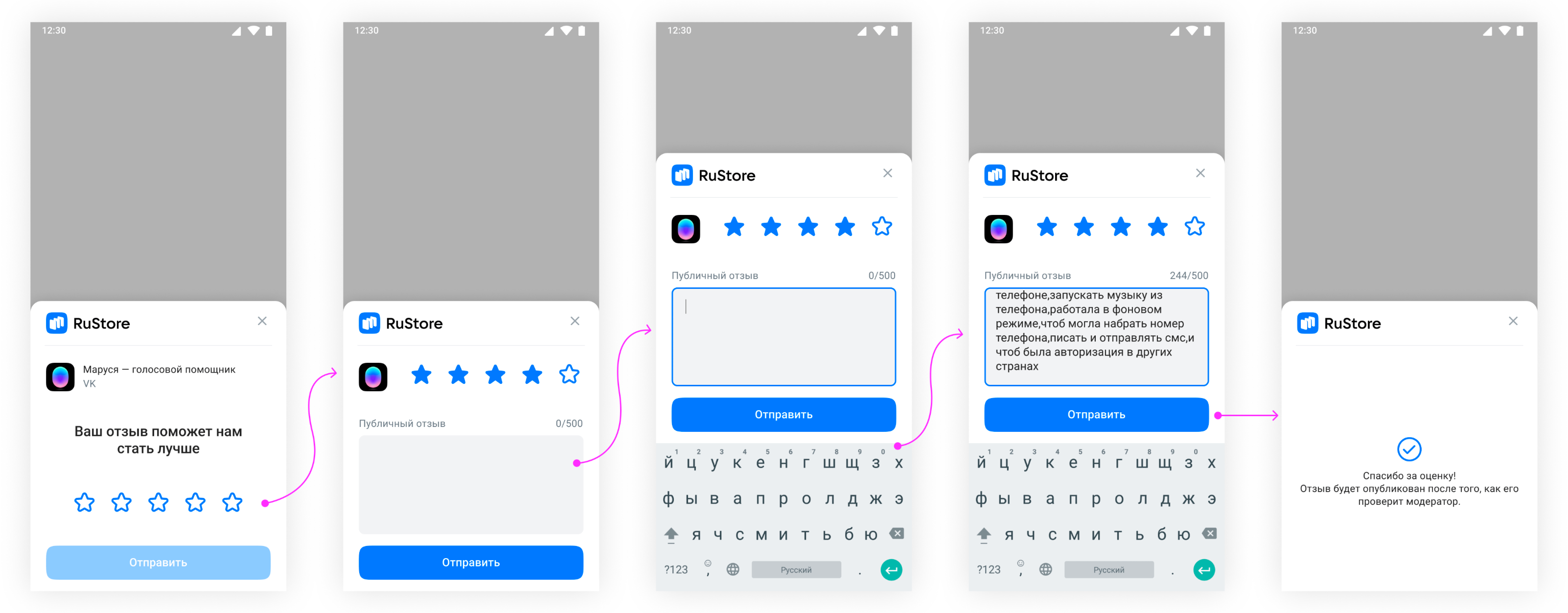
Prerequisites
The following conditions must be met for the Ratings and Reviews SDK to work.
- App uploaded to RuStore Console.
- Test build signature (for example:
debug) of the app must match the signature of the app build that was uploaded to the console and passed moderation (for example,release).
- Android 8.0 or later.
- The current version of RuStore is installed on the user's device.
- User is authorized in RuStore.
App mus be published in RuStore .
When to ask for feedback
Follow the guidelines to decide when to ask a user to rate and review your app (see below).
- Start the process after the user has used your application enough.
- Do not run the process too often - this will degrade the user experience of your application and limit the use of the ratings SDK.
- Do not use calls to action, for example, the “Rate the application” button - the user may already have reached the process launch limit.
- Your app should not ask the user any questions before launch or during the process, including questions about their opinion (for example, “Do you like the app?”) or predictive questions (for example, “Would you rate this app 5 stars?”).
Design recommendations
Follow the guidelines to decide how to integrate the process.
- Display the process as is, without any intervention or modification of the current design, including size, opacity, shape and other properties.
- Do not add anything on top or around the edges of the process.
- The process must open on top of all layers. Once the process has started, do not close it. The process will terminate on its own after explicit user action.
Connecting to the project
- Copy plugin projects from the official RuStore repository to GitFlic.
- Open the Android project from the
unreal_plugin_librariesfolder in your IDE. - Build the project with the
gradle assemblecommand.
If the build is successful, the following files will be created in the unreal_example/Plugins/RuStoreCore/Source/RuStoreReview/ThirdParty/Android/libs and unreal_example/Plugins/RuStoreCore/Source/RuStoreCore/ThirdParty/Android/libs folders:
- RuStoreUnityReview.aar;
- RuStoreUnityCore.aar.
- Copy the contents of the
unreal_example/Pluginsfolder to the “Plugins” folder inside your project. Restart Unreal Engine. - In the list of plugins (Edit > Plugins > Project > Mobile) check the plugins RuStoreReview and RuStoreCore.
- In the
YourProject.Build.csfile, in thePublicDependencyModuleNameslist, connect theRuStoreCoreandRuStoreReviewmodules. - In the project settings (Edit > Project Settings > Android) set the Minimum SDK Version parameter to at least 24 and the Target SDK Version parameter to at least 31.
Working with user ratings
Getting started with user ratings
To work with ratings, you need to initialize RuStoreReviewManager.
URuStoreReviewManager::Instance()->Init();
Example use in Blueprints (see below).
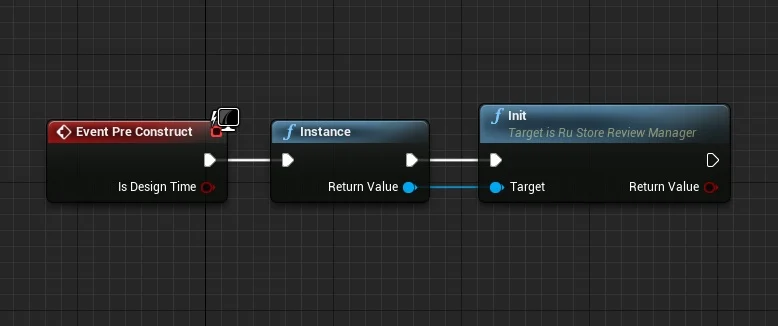
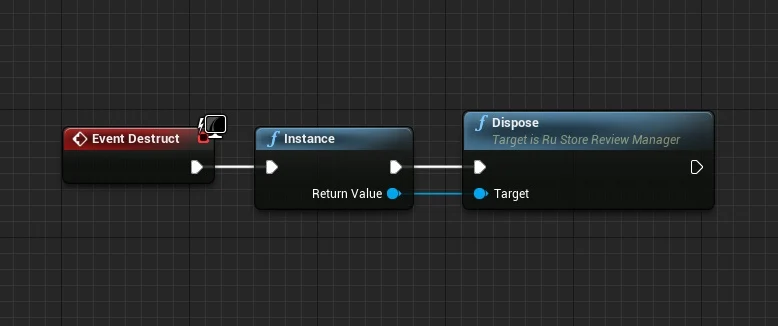
The Init() call binds the object to the scene root, and if no further work is planned on the object, the Dispose() method must be called to free up memory.
Calling the Dispose method will unbind the object from the root and safely terminate all requests sent.
URuStoreReviewManager::Instance()->Dispose();
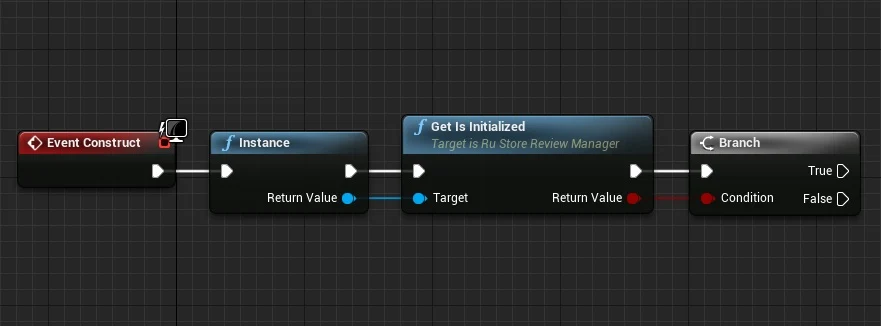
If you need to check whether a library has been initialized, use the getIsInitialized() method, its value true if the library has been initialized, and false if Init has not yet been called.
Preparing to request an app rating
CallRequestReviewFlow() in advance, before calling LaunchReviewFlow(), to prepare the necessary information for displaying the screen. The lifespan of ReviewInfo is about five minutes.
RequestReviewFlow
long requestId = URuStoreReviewManager::Instance()->RequestReviewFlow(
    [](long requestId) {
        // Process response
    },
    [](long requestId, TSharedPtr<FURuStoreError, ESPMode::ThreadSafe> error) {
        // Process error
    }
);
Example of use in Blueprints (see below).
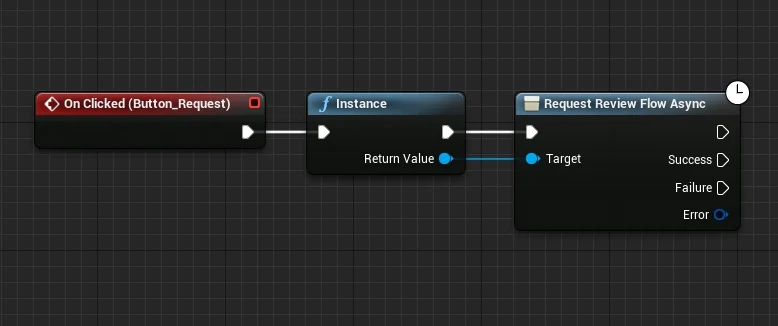
The Failure callback returns a FURuStoreError structure with error information in the Error parameter.
Triggering the in-app rating flow
To launch a form to request a rating and review of an application from a user, call theLaunchReviewFlow() method using the previously obtained ReviewInfo.
Each request receives a unique requestId within a single application run. Each event returns the requestId of the request that generated the event.
long requestId = URuStoreReviewManager::Instance()->LaunchReviewFlow(
    [](long requestId) {
        // Process response
    },
    [](long requestId, TSharedPtr<FURuStoreError, ESPMode::ThreadSafe> error) {
        // Process error
    }
);
Below is an example of use in Blueprints.
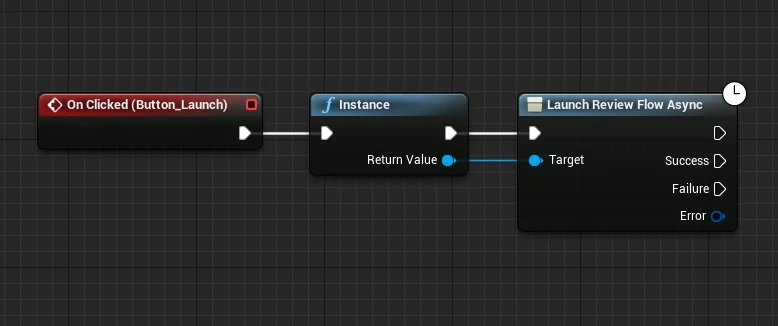
onSuccess or onFailure to continue running the application.
After completing a rating form, regardless of the result (onSuccess or onFailure), it is not recommended to display any additional forms related to rating and review.
Frequently calling LaunchReviewFlow will not result in displaying the rating form for the user; acceptable display is regulated on the RuStore side.
Handling errors
Errors that occur can be received in theFailure events.
Error structure
USTRUCT(BlueprintType)
struct RUSTORECORE_API FURuStoreError
{
    GENERATED_USTRUCT_BODY()

    FURuStoreError()
    {
        name = "";
        description = "";
    }

    UPROPERTY(BlueprintReadOnly)
    FString name;

    UPROPERTY(BlueprintReadOnly)
    FString description;
};
name— name of the error.description— description of the error.
Possible errors
RuStoreNotInstalledException— RuStore is not installed on the user's device;RuStoreOutdatedException— RuStore version installed on the user's device does not support this SDK;RuStoreUserUnauthorizedException— user is not authorized in RuStore;RuStoreRequestLimitReached— not enough time has passed since the process was last shown;RuStoreReviewExists— this user has already rated your app;RuStoreInvalidReviewInfo— problems withReviewInfo;RuStoreException— basic RuStore error from which other errors are inherited.