Unity 推送通知 SDK(版本 6.2.1)
SDK 正常运行条件
以下是 push 通知的工作条件。
- 应用程序不同类型版本(debug、release 等)的签名和包名(package name)可能互不相同。 在这种情况下,您必须在 RuStore 控制台 的“推送通知 > 项目”部分为每种版本类型创建一个项目。。
- 正在使用最新版本的 SDK。
- 已在 RuStore 控制台 的“推送通知 > 项目”部分上传应用程序数据。
用户设备上已安装分发应用(如 RuStore 等)
若要检查分发应用程序是否已安装在用户设备上,请使用RuStorePushClient.checkPushAvailability方法。。- 如果安装了 RuStore 应用程序,则允许其在后台模式下运行。 如果没有此权限,推送通知仍会送达,但会有明显的延迟。
- 设备上安装的应用程序签名指纹与 RuStore 控制台 的“推送通知 > 项目”部分中添加的应用程序签名指纹一致。
实现示例
请参阅 示例应用程序,以了解如何正确集成推送通知 SDK。
连接到项目
- Package Manager
- .unitypackage
ru.rustore.core-x.y.z.tgzru.rustore.push-x.y.z.tgz
通过 Package Manager 将包导入到项目中 (Window > Package Manager > + > Add package from tarball...)。
依赖项将通过 External Dependency Manager 自动连接:
- 打开包管理器窗口 (Window > Package Manager > + > Add package from git URL...)。
- 使用链接 https://github.com/googlesamples/unity-jar-resolver.git?path=/upm 来连接该包。
- 为了消除
Google.IOSResolver.dll will not be loaded错误,请为您的 Unity 版本安装 iOS 构建模块 (UnityHub > Installs > 您的 Unity 版本 > Add modules > iOS Build Support)。
Assembly 'Packages/com.google.external-dependency-manager/ExternalDependencyManager/Editor/1.2.182/Google.IOSResolver.dll' will not be loaded due to errors:
Unable to resolve reference 'UnityEditor.iOS.Extensions.Xcode'. Is the assembly missing or incompatible with the current platform?
Reference validation can be disabled in the Plugin Inspector.
如果您使用的是 macOS 操作系统,请更改归档实用程序的设置。 在 Archive Utility 设置中,取消勾选“尽可能继续解压 (Keep expanding if possible)”。 否则,项目存档将无法正确下载。
为了正确处理 SDK 依赖项,请执行以下设置。
-
打开项目设置:Edit → Project Settings → Player → Android Settings。
-
在 Publishing Settings 部分,启用以下设置:
- Custom Main Manifest。
- Custom Main Gradle Template。
- Custom Gradle Properties Template。
-
在 Other Settings 部分,配置:
- package name。
- Minimum API Level = 24。
- Target API Level = 34。
-
打开 External Dependency Manager 设置:Assets → External Dependency Manager → Android Resolver → Settings,启用以下设置:
- Use Jetifier。
- Patch mainTemplate.gradle。
- Patch gradleTemplate.properties。
-
更新项目依赖项:Assets → External Dependency Manager → Android Resolver → Force Resolve。
如需连接,请下载 RuStore Push SDK 并将其导入到项目中 (Assets > Import Package > Custom Package)。 依赖项将通过 External Dependency Manager(已包含在 SDK 中)自动连接。
如果您使用的是 macOS 操作系统,请更改归档实用程序的设置。 在 Archive Utility 设置中,取消勾选“尽可能继续解压 (Keep expanding if possible)”。 否则,项目存档将无法正确下载。
您也可以使用 Git 克隆代码。
为了正确处理 SDK 依赖项,请执行以下设置。
-
打开项目设置:Edit → Project Settings → Player → Android Settings。
-
在 Publishing Settings 部分,启用以下设置:
- Custom Main Manifest。
- Custom Main Gradle Template。
- Custom Gradle Properties Template。
-
在 Other Settings 部分,配置:
- package name。
- Minimum API Level = 24。
- Target API Level = 34。
-
打开 External Dependency Manager 设置:Assets → External Dependency Manager → Android Resolver → Settings,启用以下设置:
- Use Jetifier。
- Patch mainTemplate.gradle。
- Patch gradleTemplate.properties。
-
更新项目依赖项:Assets → External Dependency Manager → Android Resolver → Force Resolve。
更新
6.1.0 及更高版本的插件包含更改后的目录结构。 更改后的结构允许利用项目组件 Assembly definitions 分离构建的优势。
在安装更新之前,请删除以下文件夹。
- Assets > RuStoreSDK > PushClient > Editor。
- Assets > RuStoreSDK > Common > Editor。
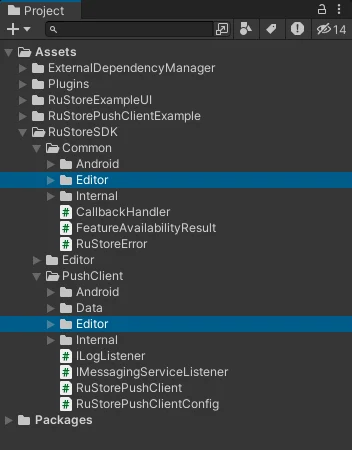
删除后,请像常规安装一样将新的 .unitypackage 导入到项目中(Assets > Import Package > Custom Package)。
编辑应用清单文件
声明 RuStoreUnityMessagingService 服务。
<service
    android:name="ru.rustore.unitysdk.pushclient.RuStoreUnityMessagingService"
    android:exported="true"
    tools:ignore="ExportedService">
    <intent-filter>
        <action android:name="ru.rustore.sdk.pushclient.MESSAGING_EVENT" />
    </intent-filter>
</service>
如果需要更改标准通知的图标或颜色,请添加以下代码。
<meta-data
    android:name="ru.rustore.sdk.pushclient.default_notification_icon"
    android:resource="@drawable/ic_baseline_android_24" />
<meta-data
    android:name="ru.rustore.sdk.pushclient.default_notification_color"
    android:resource="@color/your_favorite_color" />
如果需要重定义通知渠道,请添加以下代码。
<meta-data
    android:name="ru.rustore.sdk.pushclient.default_notification_channel_id"
    android:value="@string/pushes_notification_channel_id" />
在添加 push 通知渠道时,您必须自行创建该渠道。
为了能够通过点击推送消息跳转到应用程序,您必须将 RuStoreUnityActivity 设置为主 Activity。 为此,请在项目的清单文件中添加以下记录。
<activity android:name="ru.rustore.unitysdk.RuStoreUnityActivity" android:exported="true">
    <intent-filter>
        <action android:name="android.intent.action.MAIN" />
        <category android:name="android.intent.category.DEFAULT" />
        <category android:name="android.intent.category.LAUNCHER" />
    </intent-filter>
</activity>
同时,您必须从 com.unity3d.player.UnityPlayerActivity 这个 Activity 中删除以下 <intent-filter>。
<intent-filter>
    <action android:name="android.intent.action.MAIN" />
    <category android:name="android.intent.category.DEFAULT" />
    <category android:name="android.intent.category.LAUNCHER" />
</intent-filter>
与其他插件的兼容性
RuStoreUnityActivity 类将处理 Intents 并启动 UnityPlayerActivity。 这是为了正确处理点击推送通知进入应用程序的跳转。
如果您需要更改此行为,请修改 RuStoreUnityActivity.java 文件(路径:RuStoreSDK > PushClient > Android),将 UnityPlayerActivity 替换为您自己的类。
在 Android 13+ 中请求显示通知的权限
Android 13 版本引入了一个用于显示 push 通知的新权限。 这将影响所有在 Android 13 或更高版本上运行并使用 RuStore Push SDK 的应用程序。
默认情况下,1.4.0 及更高版本的 RuStore Push SDK 在清单文件中包含了 POST_NOTIFICATIONS 权限。
但是,应用程序还需要在运行时通过 android.permission.POST_NOTIFICATIONS 常量请求此权限。
只有在用户授予权限后,应用程序才能显示 push 通知。
请求显示 push 通知的权限。
// Declare the launcher at the top of your Activity/Fragment:
private final ActivityResultLauncher<String> requestPermissionLauncher =
    registerForActivityResult(new ActivityResultContracts.RequestPermission(), isGranted -> {
        if (isGranted) {
            // RuStore Push SDK (and your app) can post notifications.
        } else {
            // TODO: Inform user that your app will not show notifications.
        }
    });

private void askNotificationPermission() {
    // This is only necessary for API level>= 33 (TIRAMISU)
    if (Build.VERSION.SDK_INT>= Build.VERSION_CODES.TIRAMISU) {
        if (ContextCompat.checkSelfPermission(this, Manifest.permission.POST_NOTIFICATIONS) ==
                PackageManager.PERMISSION_GRANTED) {
            // RuStore Push SDK (and your app) can post notifications.
        } else if (shouldShowRequestPermissionRationale(Manifest.permission.POST_NOTIFICATIONS)) {
            // TODO: display an educational UI explaining to the user the features that will be enabled
            //       by them granting the POST_NOTIFICATION permission. This UI should provide the user
            //       "OK" and "No thanks" buttons. If the user selects "OK," directly request the permission.
            //       If the user selects "No thanks," allow the user to continue without notifications.
        } else {
            // Directly ask for the permission
            requestPermissionLauncher.launch(Manifest.permission.POST_NOTIFICATIONS);
        }
    }
}
初始化
初始化需要 来自 RuStore 控制台 的项目 ID。 要获取该 ID,请在应用程序页面中转到 推送通知 > 项目 部分,并复制 项目 ID 字段中的值。
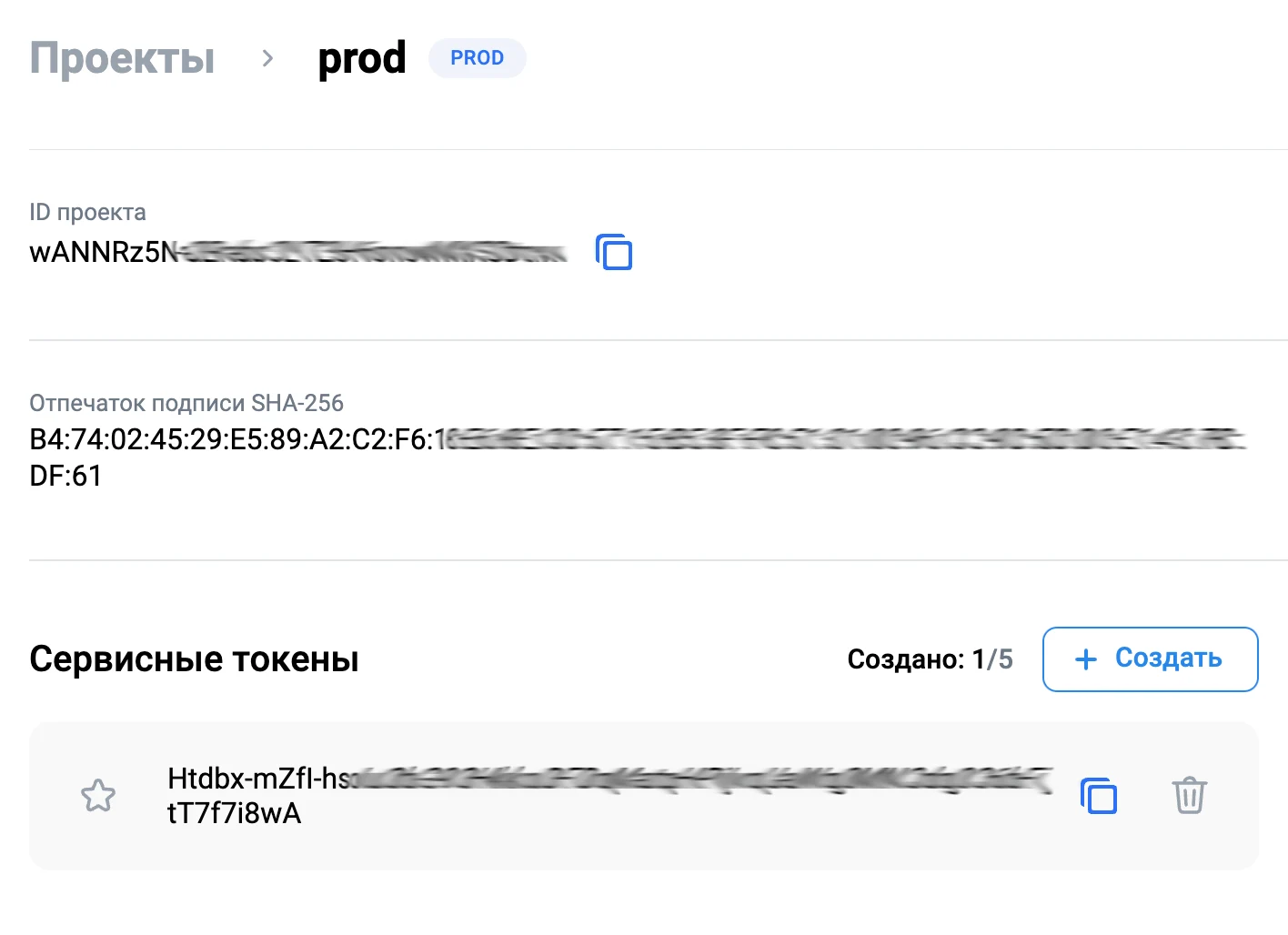
请注意,Push SDK 不支持在多个进程中同时运行。
如果您的应用程序使用多个进程,则必须仅在主进程中初始化 SDK。
如果在辅助进程中进行初始化,可能会导致 push 通知工作异常。
自动初始化
请在 AndroidManifest.xml 中添加以下代码。
<meta-data
    android:name="ru.rustore.sdk.pushclient.project_id"
    android:value="i5UTx96jw6c1C9LvdlE4cdNrWHMNyRBt" />

<meta-data
    android:name="ru.rustore.sdk.pushclient.params_class"
    android:value="ru.rustore.unitysdk.pushclient.RuStorePushClientParamsExample" />
projectId— 来自 RuStore 控制台 的项目 ID。 要获取该 ID,请在应用程序页面中转到 推送通知 > 项目 部分,并复制 项目 ID 字段中的值。params_class(可选)— 自定义AbstractRuStorePushClientParams实现类的完整名称。 该参数用于指定 push 客户端初始化时的附加参数。
RuStorePushClientParamsExample 的实现示例。
package ru.rustore.unitysdk.pushclient;

import android.content.Context;
import com.vk.push.common.clientid.ClientId;
import com.vk.push.common.clientid.ClientIdCallback;
import com.vk.push.common.clientid.ClientIdType;
import ru.rustore.sdk.pushclient.common.logger.Logger;
import ru.rustore.sdk.pushclient.provider.AbstractRuStorePushClientParams;

public class RuStorePushClientParamsExample extends AbstractRuStorePushClientParams {

    private boolean isTestModeEnabled;

    public RuStorePushClientParamsExample(Context context) {
        super(context);

        int testMode = context.getResources().getIdentifier("rustore_PushClientSettings_testMode", "string", context.getPackageName());
        isTestModeEnabled = context.getString(testMode).equalsIgnoreCase("true");
    }

    @Override
    public Logger getLogger() {
        return new UnityLogger("RuStoreUnityPushClient");
    }

    @Override
    public boolean getTestModeEnabled() {
        return isTestModeEnabled;
    }

    @Override
    public ClientIdCallback getClientIdCallback() {
        return () -> new ClientId("your_gaid_or_oaid", ClientIdType.GAID);
    }
}
在 Application 中进行手动初始化
如需手动初始化 SDK,请在项目中创建一个继承自 Application 类的 RuStorePushApplication 类。 在 onCreate 方法中调用 RuStoreUnityPushClient.INSTANCE.init。
package ru.rustore.unitysdk;

import android.app.Application;
import ru.rustore.unitysdk.pushclient.RuStoreUnityPushClient;
import ru.rustore.unitysdk.pushclient.RuStoreUnityLoggerMode;

public class RuStorePushApplication extends Application {
    public final String PROJECT_ID = "-Yv4b5cM2yfXm0bZyY6Rk7AHX8SrHmLI";

    @Override
    public void onCreate() {
        super.onCreate();

        RuStoreUnityPushClient.INSTANCE.init(
            this,
            PROJECT_ID,
            RuStoreUnityLoggerMode.UNITYLOGGER,
            "RuStoreUnityPushClient",
            false,
            null,
            null
        );
    }
}
application: Application— 一个Application类实例。projectId: String— 来自 RuStore 控制台的项目标识符。loggerMode: RuStoreUnityLoggerModeDEFAULTLOGGER— 日志记录器,默认将输出到 logcat。UNITYLOGGER— Unity 日志记录器,日志事件将自动传递给ILogListener的实现。
loggerTag: String— 用于输出日志记录的标签。testModeEnabled: Boolean— SDK 的测试运行模式。clientIdType: RuStoreUnityClientIdType?— 标识符类型:ClientIdType.GAID— Google 广告标识符;ClientIdType.OAID— 华为广告标识符。
clientIdValue: String?— 标识符的值 (your_gaid_or_oaid)。
在 AndroidManifest.xml 文件中,为 application 标签添加 android:name 属性。
<?xml version="1.0" encoding="utf-8"?>
<manifest xmlns:android="http://schemas.android.com/apk/res/android" package="rustore.unitysdk.sample" xmlns:tools="http://schemas.android.com/tools">
  <uses-permission android:name="android.permission.POST_NOTIFICATIONS" />
  <application android:name="ru.rustore.unitysdk.RuStorePushApplication">
    <activity android:name="ru.rustore.unitysdk.RuStoreUnityActivity"
              android:exported="true">
      <intent-filter>
        <action android:name="android.intent.action.MAIN" />
        <category android:name="android.intent.category.DEFAULT" />
        <category android:name="android.intent.category.LAUNCHER" />
      </intent-filter>
    </activity>
    <activity android:name="com.unity3d.player.UnityPlayerActivity"
              android:theme="@style/UnityThemeSelector" android:exported="true">
      <meta-data android:name="unityplayer.UnityActivity" android:value="true" />
    </activity>
    <service android:name="ru.rustore.unitysdk.pushclient.RuStoreUnityMessagingService" android:exported="true" tools:ignore="ExportedService">
      <intent-filter>
        <action android:name="ru.rustore.sdk.pushclient.MESSAGING_EVENT" />
      </intent-filter>
    </service>
  </application>
</manifest>
初始化插件
在调用插件方法之前,必须创建一个 RuStorePushClient push 通知客户端对象。 请执行 Init 方法以初始化客户端。
public class Example : MonoBehaviour, IMessagingServiceListener, ILogListener {
    private void Awake() {
        var pushConfig = new RuStorePushClientConfig() {
            allowNativeErrorHandling = true,
            messagingServiceListener = this,
            logListener = this
        };

        RuStorePushClient.Instance.Init(pushConfig);
    }

    /* Реализация интерфейсов IMessagingServiceListener, ILogListener */
}
Init 方法接收一个 RuStorePushClientConfig 对象作为输入参数:
- allowNativeErrorHandling — 允许在原生 SDK 中处理错误;
- messagingServiceListener — 一个实现了
IMessagingServiceListener接口的类对象; - logListener — 一个实现了
ILogListener接口的类对象。 当在 Application 中手动初始化并将loggerMode字段设置为RuStoreUnityLoggerMode.UNITYLOGGER,或在自动初始化时使用UnityLogger类时,必须指定此参数。
事件日志记录
如果您需要记录推送通知库的事件,请在您的 AbstractRuStorePushClientParams 子类中实现 getLogger 方法。 getLogger 方法必须返回一个实现了 Logger 接口的对象。
interface Logger {

    fun verbose(message: String, throwable: Throwable? = null)
    fun debug(message: String, throwable: Throwable? = null)
    fun info(message: String, throwable: Throwable? = null)
    fun warn(message: String, throwable: Throwable? = null)
    fun error(message: String, throwable: Throwable? = null)

    fun createLogger(tag: String): Logger
}
package ru.rustore.unitysdk.pushclient

import android.util.Log
import ru.rustore.sdk.pushclient.common.logger.Logger

class UnityLogger (
    private val tag: String? = null,
) : Logger {

    override fun verbose(message: String, throwable: Throwable?) {
        Log.v(tag, message, throwable)
        RuStoreUnityPushClient.Log("[V] $tag $message");
        logException(throwable)
    }

    override fun debug(message: String, throwable: Throwable?) {
        Log.d(tag, message, throwable)
        RuStoreUnityPushClient.Log("[D] $tag $message");
        logException(throwable)
    }

    override fun info(message: String, throwable: Throwable?) {
        Log.i(tag, message, throwable)
        RuStoreUnityPushClient.Log("[I] $tag $message");
        logException(throwable)
    }

    override fun warn(message: String, throwable: Throwable?) {
        Log.w(tag, message, throwable)
        RuStoreUnityPushClient.LogWarning("[W] $tag $message");
        logException(throwable)
    }

    override fun error(message: String, throwable: Throwable?) {
        Log.e(tag, message, throwable)
        RuStoreUnityPushClient.LogError("[E] $tag $message");
        logException(throwable)
    }

    private fun logException(throwable: Throwable?) {
        if (throwable != null) {
            RuStoreUnityPushClient.LogException(throwable)
        }
    }

    override fun createLogger(tag: String): Logger {
        val newTag = if (this.tag != null) {
            "${this.tag}:$tag"
        } else {
            tag
        }

        return UnityLogger(newTag)
    }
}
@NonNull
@Override
public Logger getLogger() {
    return UnityLogger("your_tag");
}
如果不传递 Logger,SDK 将使用基于 AndroidLog 的默认实现。
若要使用 Unity 脚本记录事件,请使用 ILogListener 接口的实现。 实现该接口的对象必须在插件初始化方法中传递。
namespace RuStore.PushClient {

    public interface ILogListener {

        public void Log(string logString);
        public void LogWarning(string logString);
        public void LogError(string logString);
    }
}
用户分群管理
分群是指您根据特定参数选择的一组用户。 例如,带来最高收入的用户,或使用旧版本 Android 的用户。 有关分群的详细信息,请参阅 MyTracker 文档。
要开始使用分群,请在初始化 SDK 时指定 ClientIdType 和 ClientIdValue。
public class RuStorePushClientParamsExample extends AbstractRuStorePushClientParams {

    /* Реализация AbstractRuStorePushClientParams */

    @Override
    public ClientIdCallback getClientIdCallback() {
        return () -> new ClientId("your_gaid_or_oaid", ClientIdType.GAID);
    }
}
CLIENT_ID_VALUE— 标识符的值 (your_gaid_or_oaid)。CLIENT_ID_TYPE— 标识符类型:ClientIdType.GAID— Google 广告标识符;ClientIdType.OAID— 华为广告标识符。
检查接收推送通知的能力
若要检查分发应用程序是否已安装在用户设备上,请使用RuStorePushClient.checkPushAvailability 方法。
RuStorePushClient.Instance.CheckPushAvailability(
    onFailure: (error) => {
        // Process error
    },
    onSuccess: (response) => {
        if (!response.isAvailable) {
            // Process push unavailable
        }
    }
);
Push 令牌操作方法
获取用户的 Push 令牌
如果用户没有 push 令牌,该方法将创建并返回一个新的 push 令牌。
RuStorePushClient.getToken() 方法来获取当前用户的 push 令牌。
RuStorePushClient.Instance.GetToken(
    onFailure: (error) => {
        // Process error
    },
    onSuccess: (token) => {
        // Process success
    }
);
删除用户的 Push 令牌
在初始化库之后,您可以使用RuStorePushClient.deleteToken() 方法来删除当前用户的 push 令牌。
RuStorePushClient.Instance.DeleteToken(
    onFailure: (error) => {
        // Process error
    },
    onSuccess: () => {
        // Process success
    }
);
Push 主题操作方法
订阅主题 Push 通知
初始化库后,您可以使用SubscribeToTopic(your_topic_name) 方法订阅主题。
RuStorePushClient.Instance.SubscribeToTopic(
    topicName: "your_topic_name",
    onFailure: (error) => {
        // Process error
    },
    onSuccess: () => {
        // Process success
    }
);
取消订阅主题 Push 通知
初始化库后,您可以使用UnsubscribeFromTopic(your_topic_name) 方法取消订阅主题。
RuStorePushClient.Instance.UnsubscribeFromTopic(
    topicName: "your_topic_name",
    onFailure: (error) => {
        // Process error
    },
    onSuccess: () => {
        // Process success
    }
);
从 RuStore SDK 获取数据
为了在 Unity 端接收和处理推送通知数据,请实现 IMessagingServiceListener 接口。 实现该接口的对象必须在插件初始化方法中传递。
using System.Collections.Generic;

namespace RuStore.PushClient {

    public interface IMessagingServiceListener {

        public void OnNewToken(string token);
        public void OnMessageReceived(RemoteMessage message);
        public void OnDeletedMessages();
        public void OnError(List<RuStoreError> errors);
    }
}
| 方法名称 | 描述 |
|---|---|
| 在收到新的推送令牌(push token)时调用此方法。 调用此方法后,您的应用程序负责将新的推送令牌发送到自己的服务器。 该方法返回新令牌的值。 |
| 在收到新的推送通知时调用此方法。 如果 可以通过 |
| 如果一条或多条推送通知未送达设备,则调用此方法。 例如,如果通知在送达前已过期。 在调用此方法时,建议与自己的服务器进行同步,以免丢失数据。 |
| 如果在初始化时发生错误,则调用此方法。 它返回一个包含错误对象的数组。 可能的错误:
|
通知结构
public class RemoteMessage {
    public string collapseKey;
    public Dictionary< string, string > data;
    public string messageId;
    public Notification notification;
    public int priority;
    public sbyte [] rawData;
    public int ttl;
    public string from;
}
collapseKey— 通知组的标识符(目前不考虑)。data— 一个字典,其中可以传递通知的附加数据。messageId— 消息的唯一 ID。 它是每条消息的标识符。notification— 通知对象。-
priority— 返回优先级值(目前不考虑)。 目前定义了以下选项:0—UNKNOWN;1—HIGH;2—NORMAL。
rawData— 以字节数组形式表示的data字典。ttl—Int类型的 push 通知生存时间,单位为秒。-
from— 用于识别通知来源的字段:- 对于发送到主题(topic)的通知,该字段显示主题名称;
- 在其他情况下,显示服务令牌的一部分。
public class Notification {
    public string title;
    public string body;
    public string channelId;
    public string imageUrl;
    public string color;
    public string icon;
    public string clickAction;
    public ClickActionType? clickActionType;
}
title— 通知标题。body— 通知正文。channelId— 用于指定发送通知的渠道。 适用于 Android 8.0 及更高版本。imageUrl— 用于插入通知的图像直接链接。 图像大小不得超过 1 MB。color— 以字符串形式表示的 HEX 格式通知颜色。 例如,#0077FF。icon— 来自res/drawable的通知图标,以与资源名称一致的字符串格式表示。
例如,res/drawable中有一个small_icon.xml图标,可以通过R.drawable.small_icon在代码中访问。
为了让图标在通知中显示,服务器必须在icon参数中指定small_icon的值。clickAction— 点击通知时用于打开 Activity 的intent action。clickActionType—clickAction字段的类型。
namespace RuStore.PushClient
{
    public enum ClickActionType
    {
        DEFAULT,
        DEEP_LINK,
    }
}
创建用于发送通知的渠道
发送通知的渠道遵循以下优先级。
-
如果推送通知中包含
channelId字段,RuStore SDK 将把通知发送到指定的渠道。 您的应用程序必须提前创建此渠道。 -
如果推送通知中没有
channelId字段,但您的应用程序在AndroidManifest.xml中指定了渠道参数,则将使用该指定渠道。 您的应用程序必须提前创建此渠道。 -
如果 push 通知中没有
channelId字段,且AndroidManifest.xml中未指定默认通道,RuStore SDK 将创建该通道并将通知发送至其中。 此后,所有未明确指定通道的通知都将发送到该通道。
错误处理
如果您收到 Failure 响应,不建议向用户显示错误。 显示错误可能会对用户体验产生负面影响。
namespace RuStore {

    public class RuStoreError {

        public string name;
        public string description;
    }
}
name— 错误名称。 包含错误类的simpleName名称。description— 错误消息。
如果在初始化 SDK 时传递了参数 allowNativeErrorHandling == true,在发生错误的情况下:
-
将调用相应的
onFailure处理程序。 -
错误将传递给原生 SDK 的
resolveForPush方法。 这样做是为了向用户显示错误对话框。
fun RuStoreException.resolveForPush(context: Context)
要禁用将错误传递给原生 SDK,请将 AllowNativeErrorHandling 属性的值设置为 false。
RuStorePushClient.Instance.AllowNativeErrorHandling = false;
RuStorePushClient.Instance.AllowNativeErrorHandling 的值必须在插件初始化之后设置。
可能的错误
-
RuStoreNotInstalledException— 用户设备上未安装 RuStore。 -
RuStoreOutdatedException— 用户设备上安装的 RuStore 版本不支持此 SDK。 -
RuStoreUserUnauthorizedException— 用户未在 RuStore 中登录。 -
RuStoreFeatureUnavailableException— RuStore 没有后台运行权限。 -
RuStoreException— RuStore 基础错误,其他错误均继承自此类。