评分和评论 SDK for React (版本 10.0.0)
一般
RuStore In-app 评论 SDK 鼓励用户评估您的应用程序并在 RuStore 上留下反馈,而无需离开应用程序。
评分和用户反馈场景可以随时在您的应用程序中的用户路径中运行。 用户可以从 1 到 5 评分您的应用程序,并留下反馈。
实施例子
查看 例例应用程序报告了解如何正确整合评论和评级SDK。
用户场景例子
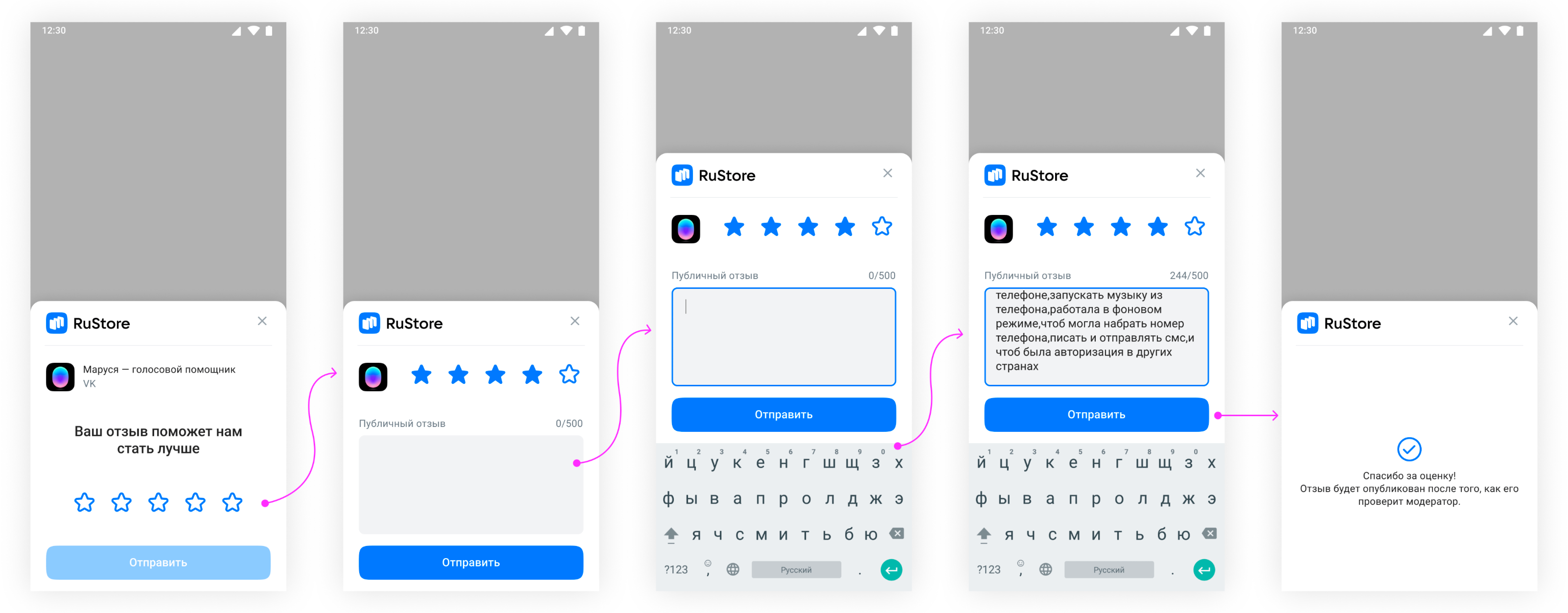
什么时候要求在应用中评分和审查
使用下面的提示来决定什么时候要求用户评分并留下反馈: (参见下方)
-
开始这个过程,一旦用户已经使用了您的应用程序很长一段时间。
-
避免经常开始,因为这会损害您的应用程序的用户体验,并限制使用或SDK评分。
-
避免使用“Rate App”按钮等行动呼叫,因为用户可能已经达到过程开始限制。
-
您的应用程序不应该在启动之前或在运行过程中向用户提出任何问题,包括他们的意见(“您喜欢该应用程序吗?”)或预测问题(“您可以给该应用程序5星?”)。
设计建议
使用下面的提示来决定如何整合过程:
-
显示过程如同,无干预或修改现有设计,包括尺寸,不透明度,形状和其他属性。
-
不要在上方或进程的侧面添加任何东西。
-
该过程应在所有层的顶部开放. 开始后不要关闭过程. 该过程在用户的明确行动后会自行关闭。
连接到项目
- Installation via Package Manager
- Installation via .unitypackage
- Cloning the repository
要集成,下载包从 发布页面:
ru.rustore.core-<version>.tgzru.rustore.review-<version>.tgz
通过包管理器(窗口 > 包管理器 > + > 添加包从 tarball...)将包导入您的项目。
Для корректной обработки зависимостей SDK выполните следующие настройки.
-
Откройте настройки проекта: Edit → Project Settings → Player → Android Settings.
-
В pазделе Publishing Settings включите следующие настройки.
- Custom Main Manifest.
- Custom Main Gradle Template.
- Custom Gradle Properties Template.
-
В разделе Other Settings настройте:
- package name.
- Minimum API Level = 24.
- Target API Level = 34.
要集成,下载 RuStoreUnityReviewSDK-version.unitypackage文件并将其进口到您的项目(资产 > 进口包 > 定制包)。
如果您使用 macOS,请调整 Archive Utility 设置. 在 Archive Utility 偏好中,如果可能,请删除 Keep 扩展。
Для корректной обработки зависимостей SDK выполните следующие настройки.
-
Откройте настройки проекта: Edit → Project Settings → Player → Android Settings.
-
В pазделе Publishing Settings включите следующие настройки.
- Custom Main Manifest.
- Custom Main Gradle Template.
- Custom Gradle Properties Template.
-
В разделе Other Settings настройте:
- package name.
- Minimum API Level = 24.
- Target API Level = 34.
更新
版本6.1.0及以后使用更新文件夹配置. 新结构允许使用 集成定义文件的模块结构的好处。
在更新之前,请删除以下文件夹:
- Assets > RuStoreSDK > Review > Editor.
- Assets > RuStoreSDK > Common > Editor.
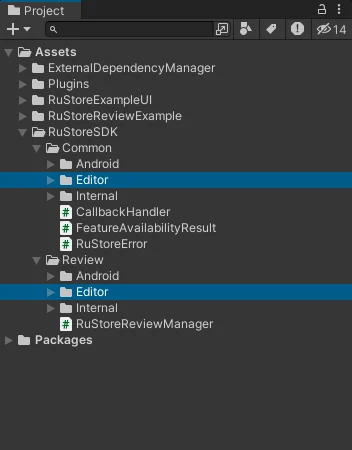
删除后,将新 .unitypackage 报告引入项目,如常规 安装报告 报告(Assets > Import Package > Custom Package)。
Repository包含插件的源代码和包含所有 SDK 方法的操作代表性的演示项目。
在 GitFlic 网站上不要使用“代码 → 下载”按钮 - 这种方法不会从 Git LFS 下载文件。
在克隆存储库之前下载并安装下列工具:
安装后完成执行命令:
git lfs install
要克隆存储库,使用以下命令:
git clone https://gitflic.ru/project/rustore/unity-rustore-review-sdk.git
cd unity-rustore-review-sdk
git lfs pull
连接依赖
- Automatic dependencies connecting
- Manual dependencies connecting
Android 构建的依赖者自动连接,使用 外部依赖管理员工具。
要自动解决依赖性,请使用命令:资产 → 外部依赖管理器 → Android 解决方案 → 强度解决方案. 此操作应每次添加新版本的插件或当文件资产/插件/Android/mainTemplate.gradle和资产/插件/Android/设置Template.gradle恢复时进行。
-
通过*.unitypackage 安装 RuStore 插件时,External Dependency Manager不需要任何特殊的安装步骤。
-
当您通过 Package Manager 安装 RuStore 插件时,请执行以下步骤:
- 在包管理器窗口中打开RuStore Core插件选项卡:Window → Package Manager → Packages RuStore → RuStore Core。
- 转到样品选项卡。
- 输入外部依赖管理员样本。
-
最新版本的External Dependency Manager也可以从开发人员的存储库中获取 GitHub:
- 打开包管理器窗口:窗口 → 包管理器 → + → 从 git URL 添加包...。
- 使用 URL
https://github.com/googlesamples/unity-jar-resolver.git?path=/upm添加包。 - 要解决“Google.IOSResolver.dll 不会加载”错误,请通过UnityHub → 安装 → 您的 Unity 版本 → 添加模块 → iOS Build 支持安装 iOS 构建支持模块。
<!-- Example error message -->
<Assembly 'Packages/com.google.external-dependency-manager/ExternalDependencyManager/Editor/1.2.182/Google.IOSResolver.dll' will not be loaded due to errors:
Unable to resolve reference 'UnityEditor.iOS.Extensions.Xcode'. Is the assembly missing or incompatible with the current platform?
Reference validation can be disabled in the Plugin Inspector.>
- 打开mainTemplate.gradle:资产 / 插件 / Android / 主Template.gradle. 在依赖性部分中,添加列:
implementation 'androidx.lifecycle:lifecycle-viewmodel:2.5.1'
implementation 'androidx.lifecycle:lifecycle-viewmodel-ktx:2.5.1'
implementation 'ru.rustore.sdk:review:x.y.z'
例如依赖性部分:
dependencies {
    implementation fileTree(dir: 'libs', include: ['*.jar'])
    implementation 'androidx.lifecycle:lifecycle-viewmodel:2.5.1'
    implementation 'androidx.lifecycle:lifecycle-viewmodel-ktx:2.5.1'
    implementation 'ru.rustore.sdk:review:x.y.z'
}
x.y.z - SDK 包版本号。
- 打开设置Template.gradle:资产 / 插件 / Android / 设置Template.gradle. 在dependencyResolutionManagement 存储库部分中,添加列:
maven {
    url "https://artifactory-external.vkpartner.ru/artifactory/maven"
}
例如dependencyResolutionManagement 存储库:
dependencyResolutionManagement {
    repositoriesMode.set(RepositoriesMode.PREFER_SETTINGS)
    repositories {
        google()
        mavenCentral()
        def unityProjectPath = $/file:///**DIR_UNITYPROJECT**/$.replace("\\", "/")
        maven {
            url "https://artifactory-external.vkpartner.ru/artifactory/maven"
        }
        mavenLocal()
        flatDir {
            dirs "${project(':unityLibrary').projectDir}/libs"
        }
与用户评级合作
以用户评分开始
要使用评论,您需要使用 RuStoreReviewManagerFactory 创建 RuStoreReviewManager。
RuStoreReviewManager.Instance.Init();
准备申请应用评级
CallRequestReviewFlow() in advance before calling LaunchReviewFlow(), to prepare necessary information to display. ReviewInfo has a lifetime — about five minutes.
RuStoreReviewManager.Instance.RequestReviewFlow(
    onFailure: (error) => {
         / Handle error
     },
    onSuccess: () => {
         / Handle success
     });
- If
onSuccess, response is received, save ReviewInfo locally to callLaunchReviewFlow. later. - If
onFailureis received, displaying the error to the user is not recommended because the user didn’t start this process.
在应用中引导评级流
To run the feedback form in your app, call theLaunchReviewFlow() method using the previously obtained ReviewInfo.
RuStoreReviewManager.Instance.LaunchReviewFlow(
    onFailure: (error) => {
         / Handle error
    },
    onSuccess: () => {
         / Handle success
    });
onSuccess or onFailure to proceed with the application.
After completing the feedback form, regardless of the outcome (onSuccess or onFailure), it is not recommended to display any additional forms related to assessment and feedback.
If called frequently, launchReviewFlow will not display the feedback window to the user, as the allowed display is regulated by RuStore.
处理错误
public class RuStoreError {
    public string name;
    public string description;
}
name- 错误名称;description- 错误描述。
onFailure.
RuStoreNotInstalledException— RuStore is not installed on the user's device;RuStoreOutdatedException— RuStore version installed on the user's device does not support this SDK;RuStoreUserUnauthorizedException— user is not authorized in RuStore;RuStoreRequestLimitReached— not enough time has passed since the process was last shown;RuStoreReviewExists— this user has already rated your app;RuStoreInvalidReviewInfo— problems withReviewInfo;RuStoreException— basic RuStore error from which other errors are inherited。