In-app Payments SDK for Kotlin/Java (version 11.0.0)
With RuStore you can integrate payments in your mobile app.
-
If you don't know where to start read the instruction.
-
If you migrate to Pay SDK from billingClient SDK, see the migration instructions. For more details, see here.
Getting started
Adding the repository
repositories {
    maven {
        url = uri("https://nexus-external.vkteam.ru/repository/maven-rustore-exposed/")
    }
}
Adding the dependency
Connecting the dependency
Add the following code to your configuration file to add the dependency.
dependencies {
    implementation(platform("ru.rustore.sdk:bom:2026.07.01"))
    implementation("ru.rustore.sdk:pay")
}
Deeplink handling
Deeplink handling in the RuStore SDK allows you to efficiently interact with third-party applications when processing payments via banking applications (SBP, SberPay, etc.). This makes it possible to redirect the user to the payment screen and, after the transaction is completed, return them to your app.
To configure deeplink handling in your app and Pay SDK, specify the deeplinkScheme using sdk_pay_scheme_value
in your AndroidManifest.xml file and override the onNewIntent method of your Activity.
- When using deeplinks, specifying the scheme is mandatory.
- If a payment is initiated without a scheme, an error will occur.
- Only ASCII characters are allowed. The format must comply with RFC-3986.
Specifying deeplinkScheme:
<?xml version="1.0" encoding="utf-8"?>
<manifest xmlns:android="http://schemas.android.com/apk/res/android"
    xmlns:tools="http://schemas.android.com/tools"
    package="your.app.package.name">

    <application
        android:allowBackup="true"
        android:icon="@mipmap/ic_launcher"
        android:label="@string/app_name"
        android:roundIcon="@mipmap/ic_launcher_round"
        android:supportsRtl="true"
        android:theme="@style/Theme.App"
        tools:targetApi="n">

          <activity
            android:name=".YourPayActivity">

            <intent-filter>
                <action android:name="android.intent.action.MAIN" />
                <category android:name="android.intent.category.LAUNCHER" />
            </intent-filter>

            <intent-filter>
                <action android:name="android.intent.action.VIEW" />
                <category android:name="android.intent.category.DEFAULT" />
                <category android:name="android.intent.category.BROWSABLE" />
                <data android:scheme="yourappscheme" />
            </intent-filter>

        </activity>


        <meta-data
            android:name="sdk_pay_scheme_value"
            android:value="yourappscheme" />

    </application>
</manifest>
Replace yourappscheme with your own scheme name, for example ru.package.name.rustore.scheme.
Then add the following code to the Activity you want to return to after the payment is completed (your app page):
class YourBillingActivity: AppCompatActivity() {

    private val intentInteractor: IntentInteractor by lazy {
        RuStorePayClient.instance.getIntentInteractor()
    }

    override fun onCreate(savedInstanceState: Bundle?) {
        super.onCreate(savedInstanceState)
        if (savedInstanceState == null) {
            intentInteractor.proceedIntent(intent, sdkTheme = SdkTheme.LIGHT)  // Optional theme
        }
    }

    override fun onNewIntent(intent: Intent?) {
        super.onNewIntent(intent)
        intentInteractor.proceedIntent(intent, sdkTheme = SdkTheme.LIGHT)  // Optional theme
    }
}
To restore your app state when returning via a deeplink, add the android:launchMode="singleTop" attribute to AndroidManifest.xml.
<?xml version="1.0" encoding="utf-8"?>
<manifest xmlns:android="http://schemas.android.com/apk/res/android"
    xmlns:tools="http://schemas.android.com/tools"
    package="your.app.package.name">
    <!-- ... -->

    <application>
      <!-- ... -->
        <activity
            android:name=".YourPayActivity"
            android:launchMode="singleTop"
            android:exported="true"
            android:screenOrientation="portrait"
            android:windowSoftInputMode="adjustResize">

            <!-- ... -->

        </activity>
      <!-- ... -->
    </application>

</manifest>
SDK initialization
Initialize the library before calling its methods.
The initialization itself is done automatically, however, for your SDK to work, define console_app_id_key in your manifest.xml.
You can so it the following way:
<?xml version="1.0" encoding="utf-8"?>
<manifest xmlns:android="http://schemas.android.com/apk/res/android"
        xmlns:tools="http://schemas.android.com/tools"
        package="your.app.package.name">

    <application
            android:allowBackup="true"
            android:icon="@mipmap/ic_launcher"
            android:label="@string/app_name"
            android:roundIcon="@mipmap/ic_launcher_round"
            android:supportsRtl="true"
            android:theme="@style/Theme.App"
            tools:targetApi="n">
        ...

        <meta-data
                android:name="console_app_id_value"
                android:value="@string/CONSOLE_APPLICATION_ID" />

        <meta-data
                android:name="sdk_pay_scheme_value"
                android:value="@string/APP_SCHEME" />

    </application>
</manifest>
-
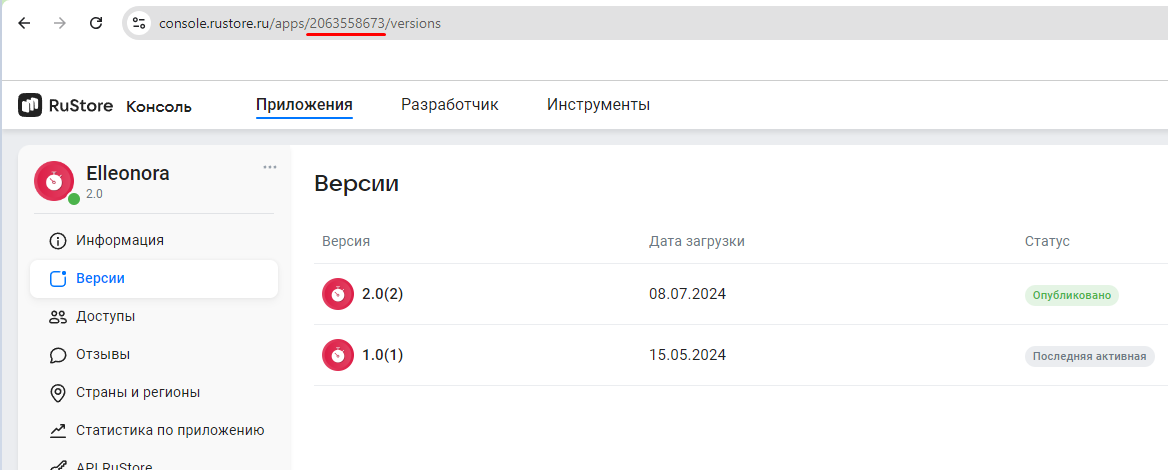
Example:CONSOLE_APPLICATION_ID— product ID form the RuStore Console.https://console.rustore.ru/apps/111111.
Where are app IDs in the RuStore Console?
- Navigate to the Applications tab and selected the needed app.
- Copy the ID from the URL address of the app page — it is a set of numbers between
apps/and/versions. FOr example, for URL addresshttps://console.rustore.ru/apps/123456/versionsthe app ID is123456.
ApplicationIdspecified inbuild.gradlemust match theapplicationIdof the APK file that you published in RuStore Console.- To work correctly with deeplink, AndroidManifest must have a
<meta-data>attribute with the name "sdk_pay_scheme_value". The value is the schema of your application. -
The
keystoresignature must match the signature that was used to sign the app published in the RuStore Console. Make sure thatbuildTypeused (example:debug) uses the same signature as the published app (example:release).
Required Permissions and Security Parameters
The Pay SDK automatically adds some permissions and parameters to the application's manifest that are necessary for the functionality related to payment security.
Other Permissions
The Pay SDK may also require other standard permissions, such as:
<uses-permission android:name="android.permission.INTERNET" />
<uses-permission android:name="android.permission.ACCESS_NETWORK_STATE" />
<uses-permission android:name="android.permission.ACCESS_WIFI_STATE" />
SDK methods
Available public interactors:
-
PurchaseInteractor— an interactor that allows you to work with payments and provides several public methods.getPurchase(purchaseId: PurchaseId): Task<Purchase>— returns information about a purchase by its ID.getPurchases(productType: ProductType? = null, purchaseStatus: PurchaseStatus? = null, acknowledgementState: AcknowledgementState? = null): Task<List<Purchase>>— returns the user's purchases. This method supports optional filtering by product type (consumable products, non-consumable products, or subscriptions), by purchase status (supported statuses:PAID,CONFIRMED,ACTIVE, andPAUSED), and by product acknowledgement state (acknowledgementState). Possible values:PENDING,ACKNOWLEDGED,UNKNOWN. By default, filters are disabled, and all user purchases are returned regardless of product type, with statusesPAID,CONFIRMED,ACTIVE, andPAUSED.getPurchaseAvailability(): Task<PurchaseAvailabilityResult>— returns the result of checking whether payments are available.purchase(params: ProductPurchaseParams, preferredPurchaseType: PreferredPurchaseType = PreferredPurchaseType.ONE_STEP, sdkTheme: SdkTheme = SdkTheme.LIGHT, purchaseEventListener: PurchaseEventListener? = null): Task<ProductPurchaseResult>— starts a product purchase with the preferred payment type: one-step (ONE_STEP) or two-step (TWO_STEP). For this method, all payment methods are available in the payment sheet. If the parameter is not specified, one-step payment is used by default.
Important!If the
TWO_STEPpayment type is specified, the SDK will attempt to start a two-step payment, but the actual result depends directly on which payment method the user selects (card, Faster Payments System, and so on).Please note that the
TWO_STEPpayment type is not available:- when the user selects Faster Payments System;
- when purchasing subscriptions.
Two-step payment is available only for a limited set of payment methods, currently cards and SberPay. If the selected payment method does not support fund holding, the purchase is started as a one-step payment.
purchaseTwoStep(params: ProductPurchaseParams, sdkTheme: SdkTheme = SdkTheme.LIGHT, purchaseEventListener: PurchaseEventListener? = null): Task<ProductPurchaseResult>— starts a guaranteed two-step product purchase flow. When using this method, the user sees only payment methods that support two-step payment in the payment sheet. During the payment process, the buyer's funds are first put on hold and are charged only after the purchase is confirmed usingconfirmTwoStepPurchase.confirmTwoStepPurchase(purchaseId: PurchaseId, developerPayload: DeveloperPayload? = null)— confirms a purchase made with two-step payment.cancelTwoStepPurchase(purchaseId: PurchaseId)— cancels a purchase made with two-step payment.updateAcknowledgementState(purchaseId: PurchaseId, state: AcknowledgementState, developerPayload: DeveloperPayload? = null): Task<AcknowledgementState>— updates the product acknowledgement state.
-
ProductInteractor— an interactor that allows you to work with products:getProducts(productsId: List<ProductId>): Task<List<Product>>— returns information about active products published in the RuStore Console.
ImportantThis method returns no more than 1000 products and works without user authorization and without RuStore being installed on the user's device.
-
UserInteractor— an interactor that allows you to get the user's authorization status asUserAuthorizationStatus. This model has two possible states:Authorized— the user is authorized in RuStore.Unauthorized— the user is not authorized in RuStore.
-
IntentInteractor— an interactor that allows you to process intents and deeplinks. It is required to correctly return from the banking app back to your app and to correctly restore the state of the payment sheet.proceedIntent(intent: Intent?, sdkTheme: SdkTheme = SdkTheme.LIGHT)— a method for processing deeplinks and restoring the payment sheet state when returning to your app from a banking app. Calling this method is required for the payment sheet to be displayed correctly after returning from the banking app.
-
RuStoreUtils— a set of public methods such as:isRuStoreInstalled— checks whether RuStore is installed on the user's device.openRuStoreDownloadInstruction— opens the web page for downloading the RuStore app.openRuStore— launches the RuStore app.openRuStoreAuthorization— launches the RuStore app for authorization. After the user is successfully authorized, the RuStore app closes automatically.
Getting the product list
- Kotlin
- Java
To retrieve the products added to your application via the RuStore Console, you must use the method:s getProducts.
RuStorePayClient.instance.getProductInteractor().getProducts(productsId = listOf(ProductId("id1"), ProductId("id2")))
    .addOnSuccessListener { products: List<Product> ->
        // Logic for working with a grocery list
    }
    .addOnFailureListener { throwable: Throwable ->
        // Error handling
    }
productsId: List<ProductId> — the list of product IDs that are set when products are created in the RuStore Console. The list is limited by 1000 items.
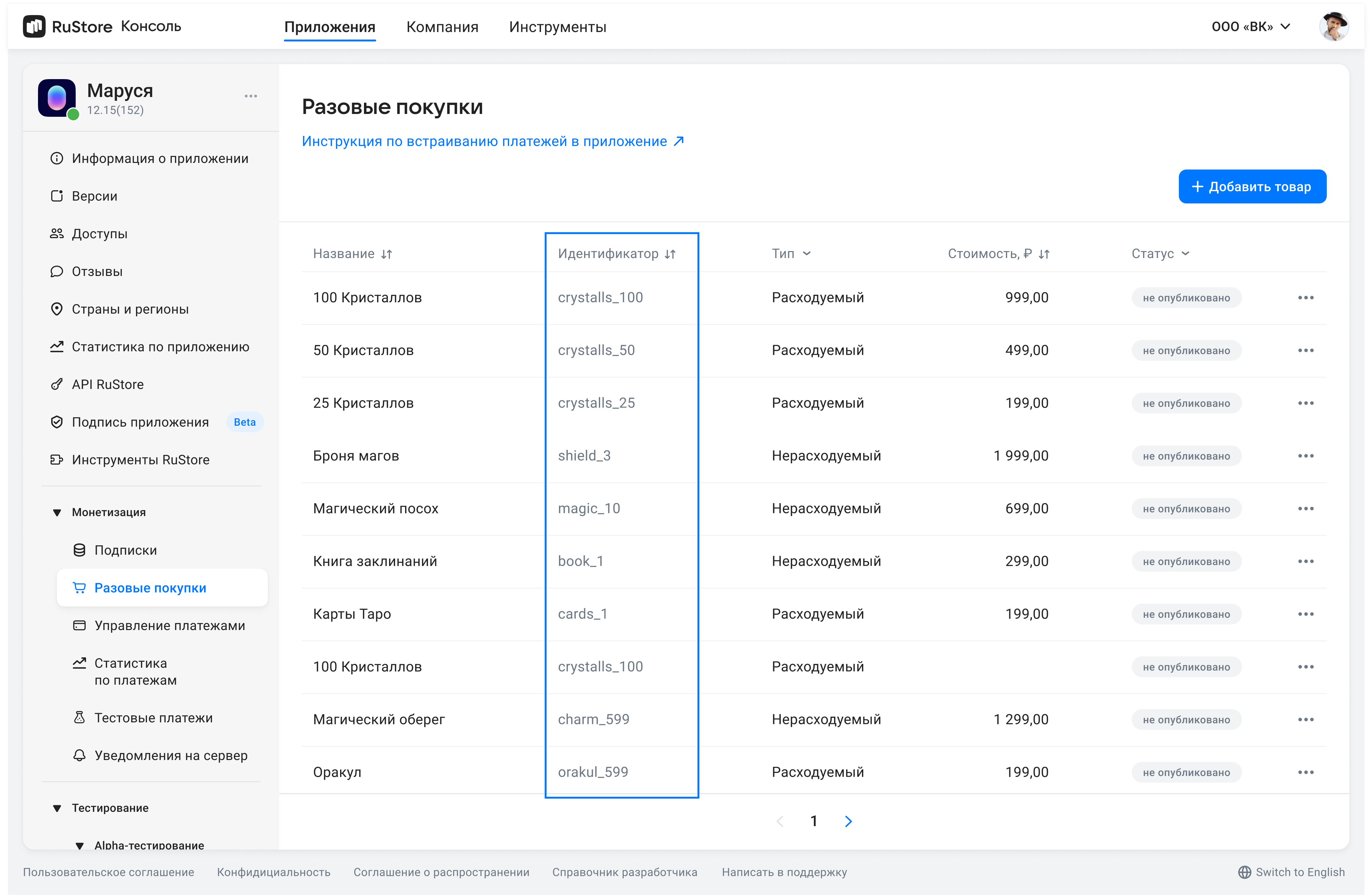
Where are product IDs in the RuStore Console?
- Navigate to the Applications tab and selected the needed app.
- Select Monetization in the left menu.
- Select product type: Subscriptions or In-App purchases.
- Copy the IDs of the required products.
The method returns a list of active products. Below is the product model.
public class Product internal constructor(
    public val productId: ProductId,
    public val type: ProductType,
    public val amountLabel: AmountLabel,
    public val price: Price?,
    public val currency: Currency,
    public val imageUrl: Url,
    public val title: Title,
    public val description: Description?,
    public val subscriptionInfo: SubscriptionInfo?,
)
productId— product ID assigned to product in RuStore Console (mandatory).type— product type.CONSUMABLE_PRODUCT/NON_CONSUMABLE_PRODUCT/SUBSCRIPTION(потребляемый/непотребляемый/подписка).amountLabel— formatted purchase price, including currency symbol.price— price in minimum currency units.currency— ISO 4217 currency code.imageUrl— image URL.title— product name inlanguage.description— descriptions inlanguage.subscriptionInfo— subscription information (will be non-null if product type isSUBSCRIPTION).
The subscriptionInfo model contains information about the subscription product.
The presence of fields does not mean that the user still has access to a free or starter period: he may have previously exhausted these periods.
Below is the model itself.
public class SubscriptionInfo internal constructor(
    public val periods: List<SubscriptionPeriod>,
)

public sealed interface SubscriptionPeriod

public class TrialPeriod internal constructor(
    public val duration: String,
    public val currency: String,
    public val price: Int,
) : SubscriptionPeriod

public class PromoPeriod internal constructor(
    public val duration: String,
    public val currency: String,
    public val price: Int,
) : SubscriptionPeriod

public class MainPeriod internal constructor(
    public val duration: String,
    public val currency: String,
    public val price: Int,
) : SubscriptionPeriod

public class GracePeriod internal constructor(
    public val duration: String,
) : SubscriptionPeriod

public class HoldPeriod internal constructor(
    public val duration: String,
) : SubscriptionPeriod
duration- длительность периода в формате ISO 8601 (как в Public API)currency- код валюты ISO 4217price- цена в минимальных единицах (копейках).
Периоды подписки
-
TrialPeriod— бесплатный период -
PromoPeriod— стартовый период -
MainPeriod— стандартный период подписки -
GracePeriod— грэйс-период -
HoldPeriod— холд-период
Подробнее о работе периодов подписки описано в статье.
Пример работы с subscriptionInfo
RuStorePayClient.instance.getProductInteractor().getProducts(productsId = listOf(ProductId("id1"), ProductId("id2")))
    .addOnSuccessListener { products: List<Product> ->
        products.forEach { product ->
            val periods = product.subscriptionInfo?.periods
            when (period) {
                is TrialPeriod -> {
                    println("Бесплатный период: ${period.duration} за ${period.price} ${period.currency}")
                }
                is PromoPeriod -> {
                    println("Стартовый период: ${period.duration} за ${period.price} ${period.currency}")
                }
                is MainPeriod -> {
                    println("Основной период: ${period.duration} за ${period.price} ${period.currency}")
                }
                is GracePeriod -> {
                    println("Период отсрочки: ${period.duration}")
                }
                is HoldPeriod -> {
                    println("Период удержания: ${period.duration}")
                }
                null -> {
                  println("subscriptionInfo is null")
                }
            }
        }
    }
    .addOnFailureListener { throwable: Throwable ->
        // Обработка ошибки
    }
Answer Examples
Illustration of model structure in the answer (not compiled code - model builders are not available outside the SDK).
Product(
    productId = ProductId("conProduct1"),
    type = ProductType.CONSUMABLE_PRODUCT,
    amountLabel = AmountLabel("100.00 руб."),
    price = Price(10000),
    currency = Currency("RUB"),
    imageUrl = Url("https://your_image_consumable_product.png"),
    title = Title("Name of the Consumed Product"),
    description = Description("Description of the product consumed"),
 )
Product(
    productId = ProductId("nonConProduct1"),
    type = ProductType.NON_CONSUMABLE_PRODUCT,
    amountLabel = AmountLabel("200.00 руб."),
    price = Price(20000),
    currency = Currency("RUB"),
    imageUrl = Url("https://your_image_non_consumable_product.png"),
    title = Title("Name of the Non-Consumable Product"),
    description = Description("Description of the Non-Consumable Product"),
 )
Product(
    productId = ProductId("sub_1"),
    type = ProductType.SUBSCRIPTION,
    amountLabel = AmountLabel("300.00 руб."),
    price = Price(30000),
    currency = Currency("RUB"),
    imageUrl = Url("https://your_image_subscription.png"),
    title = Title("Name of your subscription"),
    description = Description("Description of your subscription"),
    subscriptionInfo = SubscriptionInfo(
        periods = listOf(
            TrialPeriod(
                duration = "P1M",
                currency = "RUB",
                price = 0
            ),
            PromoPeriod(
                duration = "P5D",
                currency = "RUB",
                price = 149
            ),
            MainPeriod(
                duration = "P1Y",
                currency = "RUB",
                price = 299
            ),
            GracePeriod(
                duration = "P3D"
            ),
            HoldPeriod(
                duration = "P5D"
            )
        )
    )
 )
To retrieve the products added to your application via the RuStore Console, you must use the method:s getProducts.
List<ProductId> productsId = Arrays.asList(new ProductId("id1"), new ProductId("id2"));
ProductInteractor productInteractor = RuStorePayClient.Companion.getInstance().getProductInteractor();

productInteractor.getProducts(productsId)
    .addOnSuccessListener(products -> {
        // Logic for working with a grocery list
    })
    .addOnFailureListener(throwable -> {
        //Error handling
    });
productsId: List<ProductId> — the list of product IDs that are set when products are created in the RuStore Console. The list is limited by 1000 items.
Where are product IDs in the RuStore Console?
- Navigate to the Applications tab and selected the needed app.
- Select Monetization in the left menu.
- Select product type: Subscriptions or In-App purchases.
- Copy the IDs of the required products.
The method returns a list of active products. Below is the product model:
public class Product {
    private final ProductId productId;
    private final ProductType type;
    private final AmountLabel amountLabel;
    private final Price price;
    private final Currency currency;
    private final Url imageUrl;
    private final Title title;
    private final Description description;
    private final SubscriptionInfo subscriptionInfo;

    public Product(ProductId productId, ProductType type, AmountLabel amountLabel, @Nullable Price price, Currency currency, Url imageUrl, Title title, @Nullable Description description, @Nullable SubscriptionInfo subscriptionInfo) {
        this.productId = productId;
        this.type = type;
        this.amountLabel = amountLabel;
        this.price = price;
        this.currency = currency;
        this.imageUrl = imageUrl;
        this.title = title;
        this.description = description;
        this.subscriptionInfo = subscriptionInfo;
    }

    public ProductId getProductId() {
        return productId;
    }

    public ProductType getType() {
        return type;
    }

    public AmountLabel getAmountLabel() {
        return amountLabel;
    }

    public @Nullable Price getPrice() {
        return price;
    }

    public Currency getCurrency() {
        return currency;
    }

    public Url getImageUrl() {
        return imageUrl;
    }

    public Title getTitle() {
        return title;
    }

    public @Nullable Description getDescription() {
        return description;
    }

    public @Nullable SubscriptionInfo getSubscriptionInfo() {
        return subscriptionInfo;
    }
}
productId— product ID assigned to product in RuStore Console (mandatory).type— product type.CONSUMABLE_PRODUCT/NON_CONSUMABLE_PRODUCT/SUBSCRIPTION(потребляемый/непотребляемый/подписка).amountLabel— formatted purchase price, including currency symbol.price— price in minimum currency units.currency— ISO 4217 currency code.imageUrl— image URL.title— product name inlanguage.description— descriptions inlanguage.subscriptionInfo— subscription information (will be non-null if product type isSUBSCRIPTION).
The subscriptionInfo model contains information about the subscription product.
The presence of fields does not mean that the user still has access to a free or starter period: he may have previously exhausted these periods.
Below is the model itself.
public final class SubscriptionInfo {
    private final List<SubscriptionPeriod> periods;

    public SubscriptionInfo(List<SubscriptionPeriod> periods) {
        this.periods = periods;
    }

    public List<SubscriptionPeriod> getPeriods() {
        return periods;
    }
}

public interface SubscriptionPeriod {
    String getDuration();
}

public final class TrialPeriod implements SubscriptionPeriod {
    private final String duration;
    private final String currency;
    private final int price;

    public TrialPeriod(String duration, String currency, int price) {
        this.duration = duration;
        this.currency = currency;
        this.price = price;
    }

    public String getDuration() { return duration; }
    public String getCurrency() { return currency; }
    public int getPrice() { return price; }
}

public final class PromoPeriod implements SubscriptionPeriod {
    private final String duration;
    private final String currency;
    private final int price;

    public PromoPeriod(String duration, String currency, int price) {
        this.duration = duration;
        this.currency = currency;
        this.price = price;
    }

    public String getDuration() { return duration; }
    public String getCurrency() { return currency; }
    public int getPrice() { return price; }
}

public final class MainPeriod implements SubscriptionPeriod {
    private final String duration;
    private final String currency;
    private final int price;

    public MainPeriod(String duration, String currency, int price) {
        this.duration = duration;
        this.currency = currency;
        this.price = price;
    }

    public String getDuration() { return duration; }
    public String getCurrency() { return currency; }
    public int getPrice() { return price; }
}

public final class GracePeriod implements SubscriptionPeriod {
    private final String duration;

    public GracePeriod(String duration) {
        this.duration = duration;
    }

    public String getDuration() { return duration; }
}

public final class HoldPeriod implements SubscriptionPeriod {
    private final String duration;

    public HoldPeriod(String duration) {
        this.duration = duration;
    }

    public String getDuration() { return duration; }
}
duration- period duration in ISO 8601 format (as in Public API)currency- ISO 4217 currency codeprice- price in minimum units (kopecks).
Subscription periods
-
TrialPeriod- free period -
PromoPeriod- starting period -
MainPeriod- standard subscription period -
GracePeriod- grace period -
HoldPeriod— hold period
More details about how subscription periods work are described in article.
Пример работы с subscriptionInfo
List<ProductId> productsId = Arrays.asList(new ProductId("id1"), new ProductId("id2"));
ProductInteractor productInteractor = RuStorePayClient.Companion.getInstance().getProductInteractor();

productInteractor.getProducts(productsId)
    .addOnSuccessListener(products -> {
        for (Product product : products) {
            SubscriptionInfo subscriptionInfo = product.getSubscriptionInfo();

            if (subscriptionInfo == null) {
                println("SubscriptionInfo is null for product: " + product.getProductId());
                continue;
            }

            List<SubscriptionPeriod> periods = subscriptionInfo.getPeriods();
            if (periods == null || periods.isEmpty()) {
                continue;
            }

            for (SubscriptionPeriod period : periods) {
                switch (period) {
                    case TrialPeriod trialPeriod ->
                        println("Бесплатный период: " + trialPeriod.getDuration() +
                            " за " + trialPeriod.getPrice() + " " + trialPeriod.getCurrency());
                    case PromoPeriod promoPeriod ->
                        println("Стартовый период: " + promoPeriod.getDuration() +
                            " за " + promoPeriod.getPrice() + " " + promoPeriod.getCurrency());
                    case MainPeriod mainPeriod ->
                        println("Основной период: " + mainPeriod.getDuration() +
                            " за " + mainPeriod.getPrice() + " " + mainPeriod.getCurrency());
                    case GracePeriod gracePeriod ->
                        println("Период отсрочки: " + gracePeriod.getDuration());
                    case HoldPeriod holdPeriod ->
                        println("Период удержания: " + holdPeriod.getDuration());
                    default ->
                        println("Unknown period type: " + period.getClass().getSimpleName());
                }
            }
        }
    })
    .addOnFailureListener(throwable -> {
        // Error handling
    });
Answer Examples
Illustration of model structure in the answer (not compiled code - model builders are not available outside the SDK).
Product(
    productId = ProductId("conProduct1"),
    type = ProductType.CONSUMABLE_PRODUCT,
    amountLabel = AmountLabel("100.00 руб."),
    price = Price(10000),
    currency = Currency("RUB"),
    imageUrl = Url("https://your_image_consumable_product.png"),
    title = Title("Name of the Consumed Product"),
    description = Description("Description of the product consumed"),
 )
Product(
    productId = ProductId("nonConProduct1"),
    type = ProductType.NON_CONSUMABLE_PRODUCT,
    amountLabel = AmountLabel("200.00 руб."),
    price = Price(20000),
    currency = Currency("RUB"),
    imageUrl = Url("https://your_image_non_consumable_product.png"),
    title = Title("Name of the Non-Consumable Product"),
    description = Description("Description of the Non-Consumable Product"),
 )
Product(
    productId = ProductId("sub_1"),
    type = ProductType.SUBSCRIPTION,
    amountLabel = AmountLabel("300.00 руб."),
    price = Price(30000),
    currency = Currency("RUB"),
    imageUrl = Url("https://your_image_subscription.png"),
    title = Title("Name of your subscription"),
    description = Description("Description of your subscription"),
    subscriptionInfo = SubscriptionInfo(
        periods = listOf(
            TrialPeriod(
                duration = "P1M",
                currency = "RUB",
                price = 0
            ),
            PromoPeriod(
                duration = "P5D",
                currency = "RUB",
                price = 149
            ),
            MainPeriod(
                duration = "P1Y",
                currency = "RUB",
                price = 299
            ),
            GracePeriod(
                duration = "P3D"
            ),
            HoldPeriod(
                duration = "P5D"
            )
        )
    )
 )
Checking whether the user is authorized
To check the user's authorization status, call the getUserAuthorizationStatus method of UserInteractor.
The result is returned as a UserAuthorizationStatus class.
Two values are available:
AUTHORIZED— the user is authorized in RuStore or via VK ID in the payment sheet.UNAUTHORIZED— the user is not authorized. This value is also returned if RuStore is not installed on the user's device.
- Kotlin
- Java
RuStorePayClient.instance.getUserInteractor().getUserAuthorizationStatus()
    .addOnSuccessListener { result ->
        when (result) {
            UserAuthorizationStatus.AUTHORIZED -> {
                 // Logic when the user is authorized in RuStore or in the payment sheet
            }

            UserAuthorizationStatus.UNAUTHORIZED -> {
                // Logic when the user is NOT authorized
            }
        }
    }.addOnFailureListener { throwable ->
        // Error handling
    }
UserInteractor userInteractor = RuStorePayClient.Companion.getInstance().getUserInteractor();
userInteractor.getUserAuthorizationStatus()
    .addOnSuccessListener(status -> {
        switch (status) {
            case AUTHORIZED:
                // Logic when the user is authorized in RuStore or in the payment sheet
                break;
            case UNAUTHORIZED:
                // Logic when the user is NOT authorized
                break;
            }
    })
    .addOnFailureListener(throwable -> {
        // Error handling
    });
Checking payment availability
To check payment availability, call the getPurchaseAvailability method on PurchaseInteractor. When called, the following conditions are checked:
- The company has monetization enabled via the RuStore Developer Console.
- The application must not be banned in RuStore.
- The user must not be banned in RuStore.
If all conditions are met, PurchaseAvailabilityResult.Available is returned. Otherwise, PurchaseAvailabilityResult.Unavailable(val cause: Throwable) is returned, where cause is the error indicating the unmet condition. To check the reason for this result, you should check the error type for RuStoreException (these errors are described in the Error Handling section).
- Kotlin
- Java
The reason for unavailability of payments is in the cause: Throwable field of the PurchaseAvailabilityResult.Unavailable result.
RuStorePayClient.instance.getPurchaseInteractor().getPurchaseAvailability()
    .addOnSuccessListener { result ->
        when (result) {
            is PurchaseAvailabilityResult.Available -> {
                 // Processing the payment availability result
            }

            is PurchaseAvailabilityResult.Unavailable -> {
                // Processing the result of unavailable payments
            }
        }
    }.addOnFailureListener { throwable ->
       // Error handling
    }
PurchaseInteractor purchaseInteractor = RuStorePayClient.Companion.getInstance().getPurchaseInteractor();

purchaseInteractor.getPurchaseAvailability()
    .addOnSuccessListener(result -> {
        if (result instanceof PurchaseAvailabilityResult.Available) {
           // Processing the payment availability result
        } else if (result instanceof PurchaseAvailabilityResult.Unavailable) {
            // Processing the result of unavailable payments
        }
    })
    .addOnFailureListener(throwable -> {
        // Error handling
    });
Purchasing a product
- When using a single-stage payment, the purchase does not require confirmation; the funds are immediately debited from the buyer’s account, and a commission is charged to the developer. In this case, if a refund to the customer is required (for example, if the product cannot be delivered for some reason), a refund can only be processed via the RuStore Console, and the funds will be returned to the buyer within a few days. The full purchase amount is refunded, but the commission previously withheld from the developer is not reimbursed.
- In the case of a two-stage payment, the funds are first held (authorized) on the buyer’s account. No commission is charged at this stage. After the hold, the purchase requires either confirmation or cancellation. The commission is charged to the developer upon purchase confirmation. Cancelling the purchase releases the hold, and the funds instantly become available to the buyer again.
At this time, a subscription purchase (SubscriptionPurchase) can only be made using the one-step payment flow (PurchaseType.ONE_STEP).
Two-stage payment is available only for a specific set of payment methods (currently — only for cards). SBP technologies do not support two-stage payment. If a payment method that does not support holding funds is selected, the purchase will be processed using the single-stage scenario.
- Kotlin
- Java
Payment with choice of purchase type
To call a product purchase with a choice of stages of payment, use the purchase method.
val params = ProductPurchaseParams(
    productId = ProductId("productId"),
    orderId = null,
    quantity = null,
    developerPayload = null,
    appUserId = null,
    appUserEmail = null,
)
RuStorePayClient.instance.getPurchaseInteractor()
    .purchase(params = params, preferredPurchaseType = PreferredPurchaseType.ONE_STEP, sdkTheme = SdkTheme.LIGHT, purchaseEventListener = null)
    .addOnSuccessListener { result ->
        // Logic for processing a successful purchase result
    }
    .addOnFailureListener { throwable: Throwable ->
        when(throwable){
            is RuStorePaymentException.ProductPurchaseException -> // Handling a product purchase error
            is RuStorePaymentException.ProductPurchaseCancelled -> // Processing a product purchase cancellation
            else -> //Error handling
        }
    }
productId— product ID assigned to product in RuStore Console (mandatory).quantity— product amount (optional, value1will be used if not specified).orderId— payment ID generated by the app (optional). If you specify this parameter in your system, you will receive it via our API. If not specified, will be generated automatically (uuid). 150 characters max.developerPayload— an additional order information string that you can set when confirming a purchase. This string overrides the value set during initialization. Maximum length: 250 characters. Characters are not escaped (if quotes are used, escaping is required). Maximum length is 250 characters. Characters are not escaped.<AppUserId name="appUserId"/>appUserEmailis an optional parameter that lets you set the user’s email address in your app. If the customer’s email address was specified during registration in your app, you can pass it to automatically prefill theemailfield when sending a receipt — both for payments outside RuStore and in cases where the user is not authorized in RuStore. This removes the need for the user to enter their email manually, shortens the path to purchase, and helps improve conversion.preferredPurchaseType– the desired purchase flow type: one-step (ONE_STEP) or two-step (TWO_STEP).sdkTheme– the color theme of the payment screen. Two options are available:LIGHTandDARK(light and dark themes, respectively). To preserve backward compatibility between SDK versions, this parameter has the default valueLIGHT.purchaseEventListener— a set of callback functions that lets you receiveinvoiceIdandpurchaseIdat different stages of the purchase flow — optional.
preferredPurchaseType— the desired purchase type: single-stage (ONE_STEP) or two-stage (TWO_STEP).
This method is launched by default using the single-stage payment scenario (preferredPurchaseType = PreferredPurchaseType.ONE_STEP), i.e., without funds being held.
For two-stage payment, you need to specify preferredPurchaseType = PreferredPurchaseType.TWO_STEP. Two-stage payment (i.e., payment with funds being held) is not guaranteed for this method and directly depends on the payment method (card, SPB, etc.) selected by the user.
When launching this method (with the preferred preferredPurchaseType = twoStep), until the user selects a payment method, the purchase stage will be UNDEFINED. Please take this behavior into account when handling purchase cancellation results (ProductPurchaseCancelled) or purchase errors (ProductPurchaseException).
Two-stage payment (with holding funds)
To invoke the purchase of a product in a two-step scenario, use the purchaseTwoStep method.
When calling this method, the user will have access to a limited set of payment methods - only those that support two-step payment.
At the moment, subscription purchases (SubscriptionPurchase) can only be made using a one-step payment (PurchaseType.ONE_STEP).
val params = ProductPurchaseParams(
    productId = ProductId("productId"),
    orderId = null,
    quantity = null,
    developerPayload = null,
    appUserId = null,
    appUserEmail = null,
)
RuStorePayClient.instance.getPurchaseInteractor()
    .purchaseTwoStep(params = params, sdkTheme = SdkTheme.LIGHT, purchaseEventListener = null)
    .addOnSuccessListener { result ->
        // Logic for processing a successful purchase result
    }
    .addOnFailureListener { throwable: Throwable ->
        when(throwable){
            is RuStorePaymentException.ProductPurchaseException -> // Handling a product purchase error
            is RuStorePaymentException.ProductPurchaseCancelled -> // Processing a product purchase cancellation
            else -> // Error handling
        }
    }
productId— product ID assigned to product in RuStore Console (mandatory).quantity— product amount (optional, value1will be used if not specified).orderId— payment ID generated by the app (optional). If you specify this parameter in your system, you will receive it via our API. If not specified, will be generated automatically (uuid). 150 characters max.developerPayload— an additional order information string that you can set when confirming a purchase. This string overrides the value set during initialization. Maximum length: 250 characters. Characters are not escaped (if quotes are used, escaping is required). Maximum length is 250 characters. Characters are not escaped.<AppUserId name="appUserId"/>appUserEmailis an optional parameter that lets you set the user’s email address in your app. If the customer’s email address was specified during registration in your app, you can pass it to automatically prefill theemailfield when sending a receipt — both for payments outside RuStore and in cases where the user is not authorized in RuStore. This removes the need for the user to enter their email manually, shortens the path to purchase, and helps improve conversion.preferredPurchaseType– the desired purchase flow type: one-step (ONE_STEP) or two-step (TWO_STEP).sdkTheme– the color theme of the payment screen. Two options are available:LIGHTandDARK(light and dark themes, respectively). To preserve backward compatibility between SDK versions, this parameter has the default valueLIGHT.purchaseEventListener— a set of callback functions that lets you receiveinvoiceIdandpurchaseIdat different stages of the purchase flow — optional.
Structure of purchase parameters
public class ProductPurchaseParams(
    public val productId: ProductId,
    public val quantity: Quantity? = null,
    public val orderId: OrderId? = null,
    public val developerPayload: DeveloperPayload? = null,
    public val appUserId: AppUserId? = null,
    public val appUserEmail: AppUserEmail? = null,
)
productId— product ID assigned to product in RuStore Console (mandatory).quantity— product amount (optional, value1will be used if not specified).orderId— payment ID generated by the app (optional). If you specify this parameter in your system, you will receive it via our API. If not specified, will be generated automatically (uuid). 150 characters max.developerPayload— an additional order information string that you can set when confirming a purchase. This string overrides the value set during initialization. Maximum length: 250 characters. Characters are not escaped (if quotes are used, escaping is required). Maximum length is 250 characters.-
appUserId— the internal user ID in your application (optional parameter). A string with a maximum length of 128 characters.tipFor example, this parameter can be used to detect cases of fraud in your application, which will help improve its security.
appUserEmail— this is an optional parameter that allows you to specify the user's email address in your application. If the buyer's email address was provided during registration in the app, it can be passed for automatic filling of theemailfield when sending a receipt — both for payments outside RuStore and in cases where the user is not authorized in RuStore. This saves the user from having to manually enter their email, shortens the purchase flow, and helps increase conversion.
Working with PurchaseEventListener
This interface is a set of callback functions for purchase events that are called during the purchase process.
public interface PurchaseEventListener {
    public fun onPurchaseCreated(purchaseId: PurchaseId, invoiceId: InvoiceId)
    public fun onPaymentStarted(purchaseId: PurchaseId, invoiceId: InvoiceId)
    public fun onPaymentCompleted(purchaseId: PurchaseId, invoiceId: InvoiceId)
    public fun onPaymentFailed(purchaseId: PurchaseId?, invoiceId: InvoiceId?)
    public fun onPurchaseCancelled(purchaseId: PurchaseId?, invoiceId: InvoiceId?)
}
The implementation is passed to the purchase() and purchaseTwoStep() methods. Thanks to these notifications, you can receive data about the purchaseId and invoiceId at different stages of the purchase in order to interact with this information. For example, transfer a value to analytics or write to a database.
val params = ProductPurchaseParams(
    productId = ProductId("productId"),
    orderId = null,
    quantity = null,
    developerPayload = null,
    appUserId = null,
    appUserEmail = null,
)
val purchaseEventListener = object : PurchaseEventListener {
    override fun onPurchaseCreated(purchaseId: PurchaseId, invoiceId: InvoiceId) {
        // Implementing a method when creating a purchase
    }
    override fun onPaymentStarted(purchaseId: PurchaseId, invoiceId: InvoiceId) {
        // Implementation of the method at the start of the purchase
    }
    override fun onPaymentCompleted(purchaseId: PurchaseId, invoiceId: InvoiceId) {
        // Implementation of the method upon successful completion of the purchase
    }
    override fun onPaymentFailed(purchaseId: PurchaseId?, invoiceId: InvoiceId?) {
        // Implementing a method when a purchase is unsuccessful
    }
    override fun onPurchaseCancelled(purchaseId: PurchaseId?, invoiceId: InvoiceId?) {
        // Implementing a method when canceling a purchase
    }
}
RuStorePayClient.instance.getPurchaseInteractor()
    .purchase(params = params, sdkTheme = SdkTheme.LIGHT, purchaseEventListener = purchaseEventListener)
    .addOnSuccessListener { result ->
        // Logic for processing a successful purchase result
    }
    .addOnFailureListener { throwable: Throwable ->
        when(throwable){
            is RuStorePaymentException.ProductPurchaseException -> // Handling product purchase error
            is RuStorePaymentException.ProductPurchaseCancelled -> // Processing product cancellations
            else -> // Error handling
        }
    }
Payment with choice of purchase type
To call a product purchase with a choice of stages of payment, use the purchase method.
ProductPurchaseParams params = new ProductPurchaseParams(new ProductId("productId"), null, null, null, null, null);

RuStorePayClient ruStorePayClient = RuStorePayClient.Companion.getInstance();
PurchaseInteractor purchaseInteractor = ruStorePayClient.getPurchaseInteractor();

purchaseInteractor.purchase(params, PreferredPurchaseType.ONE_STEP, SdkTheme.LIGHT, null)
    .addOnSuccessListener(result -> {
        // Logic for processing a successful purchase result
    })
    .addOnFailureListener(throwable -> {
        if (throwable instanceof RuStorePaymentException.ProductPurchaseException) {
            // Handling a product purchase error
        } else if (throwable instanceof RuStorePaymentException.ProductPurchaseCancelled) {
            // Processing a product purchase cancellation
        } else {
            // Error handling
           }
    });
productId— product ID assigned to product in RuStore Console (mandatory).quantity— product amount (optional, value1will be used if not specified).orderId— payment ID generated by the app (optional). If you specify this parameter in your system, you will receive it via our API. If not specified, will be generated automatically (uuid). 150 characters max.developerPayload— an additional order information string that you can set when confirming a purchase. This string overrides the value set during initialization. Maximum length: 250 characters. Characters are not escaped (if quotes are used, escaping is required). Maximum length is 250 characters. Characters are not escaped.<AppUserId name="appUserId"/>appUserEmailis an optional parameter that lets you set the user’s email address in your app. If the customer’s email address was specified during registration in your app, you can pass it to automatically prefill theemailfield when sending a receipt — both for payments outside RuStore and in cases where the user is not authorized in RuStore. This removes the need for the user to enter their email manually, shortens the path to purchase, and helps improve conversion.preferredPurchaseType– the desired purchase flow type: one-step (ONE_STEP) or two-step (TWO_STEP).sdkTheme– the color theme of the payment screen. Two options are available:LIGHTandDARK(light and dark themes, respectively). To preserve backward compatibility between SDK versions, this parameter has the default valueLIGHT.purchaseEventListener— a set of callback functions that lets you receiveinvoiceIdandpurchaseIdat different stages of the purchase flow — optional.
This method is launched by default using the single-stage payment scenario (preferredPurchaseType = PreferredPurchaseType.ONE_STEP), i.e., without funds being held.
For two-stage payment, you need to specify preferredPurchaseType = PreferredPurchaseType.TWO_STEP. Two-stage payment (i.e., payment with funds being held) is not guaranteed for this method and directly depends on the payment method (card, SPB, etc.) selected by the user.
When launching this method (with the preferred preferredPurchaseType = twoStep), until the user selects a payment method, the purchase stage will be UNDEFINED. Please take this behavior into account when handling purchase cancellation results (ProductPurchaseCancelled) or purchase errors (ProductPurchaseException).
Two-stage payment (with holding funds)
To invoke the purchase of a product in a two-step scenario, use the purchaseTwoStep method.
When calling this method, the user will have access to a limited set of payment methods - only those that support two-step payment.
At the moment, subscription purchases (SubscriptionPurchase) can only be made using a one-step payment (PurchaseType.ONE_STEP).
ProductPurchaseParams params = new ProductPurchaseParams(new ProductId("productId"), null, null, null, null, null);
PurchaseInteractor purchaseInteractor = RuStorePayClient.Companion.getInstance().getPurchaseInteractor();

purchaseInteractor.purchaseTwoStep(params, SdkTheme.LIGHT)
    .addOnSuccessListener(result -> {
        // Logic for processing a successful purchase result
    })
    .addOnFailureListener(throwable -> {
        if (throwable instanceof RuStorePaymentException.ProductPurchaseException) {
            // Handling a product purchase error
        } else if (throwable instanceof RuStorePaymentException.ProductPurchaseCancelled) {
            // Processing a product purchase cancellation
        } else {
            //Error handling
        }
    });
productId— product ID assigned to product in RuStore Console (mandatory).quantity— product amount (optional, value1will be used if not specified).orderId— payment ID generated by the app (optional). If you specify this parameter in your system, you will receive it via our API. If not specified, will be generated automatically (uuid). 150 characters max.developerPayload— an additional order information string that you can set when confirming a purchase. This string overrides the value set during initialization. Maximum length: 250 characters. Characters are not escaped (if quotes are used, escaping is required). Maximum length is 250 characters. Characters are not escaped.<AppUserId name="appUserId"/>appUserEmailis an optional parameter that lets you set the user’s email address in your app. If the customer’s email address was specified during registration in your app, you can pass it to automatically prefill theemailfield when sending a receipt — both for payments outside RuStore and in cases where the user is not authorized in RuStore. This removes the need for the user to enter their email manually, shortens the path to purchase, and helps improve conversion.preferredPurchaseType– the desired purchase flow type: one-step (ONE_STEP) or two-step (TWO_STEP).sdkTheme– the color theme of the payment screen. Two options are available:LIGHTandDARK(light and dark themes, respectively). To preserve backward compatibility between SDK versions, this parameter has the default valueLIGHT.purchaseEventListener— a set of callback functions that lets you receiveinvoiceIdandpurchaseIdat different stages of the purchase flow — optional.
Structure of purchase parameters
public class ProductPurchaseParams {
    private final ProductId productId;
    private final Quantity quantity;
    private final OrderId orderId;
    private final DeveloperPayload developerPayload;
    private final AppUserId appUserId;
    private final AppUserEmail appUserEmail;

    public ProductPurchaseParams(ProductId productId, @Nullable Quantity quantity, @Nullable OrderId orderId, @Nullable DeveloperPayload developerPayload, @Nullable AppUserId appUserId, @Nullable AppUserEmail appUserEmail) {
        this.productId = productId;
        this.quantity = quantity;
        this.orderId = orderId;
        this.developerPayload = developerPayload;
        this.appUserId = appUserId;
        this.appUserEmail = appUserEmail;
    }

    public ProductId getProductId() {
        return productId;
    }

    public @Nullable Quantity getQuantity() {
        return quantity;
    }

    public @Nullable OrderId getOrderId() {
        return orderId;
    }

    public @Nullable DeveloperPayload getDeveloperPayload() {
        return developerPayload;
    }

    public @Nullable AppUserId getAppUserId() {
        return appUserId;
    }

    public @Nullable AppUserEmail getAppUserEmail() {
        return appUserEmail;
    }
}
productId— product ID assigned to product in RuStore Console (mandatory).quantity— product amount (optional, value1will be used if not specified).orderId— payment ID generated by the app (optional). If you specify this parameter in your system, you will receive it via our API. If not specified, will be generated automatically (uuid). 150 characters max.developerPayload— an additional order information string that you can set when confirming a purchase. This string overrides the value set during initialization. Maximum length: 250 characters. Characters are not escaped (if quotes are used, escaping is required). Maximum length is 250 characters.-
appUserId— the internal user ID in your application (optional parameter). A string with a maximum length of 128 characters.tipFor example, this parameter can be used to detect cases of fraud in your application, which will help improve its security.
appUserEmail— this is an optional parameter that allows you to specify the user's email address in your application. If the buyer's email address was provided during registration in the app, it can be passed for automatic filling of theemailfield when sending a receipt — both for payments outside RuStore and in cases where the user is not authorized in RuStore. This saves the user from having to manually enter their email, shortens the purchase flow, and helps increase conversion.
Working with PurchaseEventListener
This interface is a set of callback functions for purchase events that are called during the purchase process.
public interface PurchaseEventListener {
   void onPurchaseCreated(@NotNull PurchaseId purchaseId, @NotNull InvoiceId invoiceId);
   void onPaymentStarted(@NotNull PurchaseId purchaseId, @NotNull InvoiceId invoiceId);
   void onPaymentCompleted(@NotNull PurchaseId purchaseId, @NotNull InvoiceId invoiceId);
   void onPaymentFailed(@Nullable PurchaseId purchaseId, @Nullable InvoiceId invoiceId);
   void onPurchaseCancelled(@Nullable PurchaseId purchaseId, @Nullable InvoiceId invoiceId);
}
The implementation is passed to the purchase() and purchaseTwoStep() methods. Thanks to these notifications, you can receive data about the purchaseId and invoiceId at different stages of the purchase in order to interact with this information. For example, transfer a value to analytics or write to a database.
PurchaseInteractor purchaseInteractor = RuStorePayClient.Companion.getInstance().getPurchaseInteractor();
ProductPurchaseParams params = new ProductPurchaseParams(new ProductId("productId"), null, null, null, null, null);
PurchaseEventListener purchaseEventListener = new PurchaseEventListener() {
    @Override
    public void onPurchaseCreated(@NotNull PurchaseId purchaseId, @NotNull InvoiceId invoiceId) {
        // Implementing a method when creating a purchase
    }
    @Override
    public void onPaymentStarted(@NotNull PurchaseId purchaseId, @NotNull InvoiceId invoiceId) {
        // Implementation of the method at the start of the purchase
    }
    @Override
    public void onPaymentCompleted(@NotNull PurchaseId purchaseId, @NotNull InvoiceId invoiceId) {
        // Implementation of the method upon successful completion of the purchase
    }
    @Override
    public void onPaymentFailed(@Nullable PurchaseId purchaseId, @Nullable InvoiceId invoiceId) {
        // Implementing a method when a purchase is unsuccessful
    }
    @Override
    public void onPurchaseCancelled(@Nullable PurchaseId purchaseId, @Nullable InvoiceId invoiceId) {
        // Implementing a method when canceling a purchase
    }
};

purchaseInteractor.purchase(params, PreferredPurchaseType.ONE_STEP, SdkTheme.LIGHT, purchaseEventListener)
        .addOnSuccessListener(result -> {
            // Logic for processing a successful purchase result
        })
        .addOnFailureListener(throwable -> {
            if (throwable instanceof RuStorePaymentException.ProductPurchaseException) {
                // Handling a product purchase error
            } else if (throwable instanceof RuStorePaymentException.ProductPurchaseCancelled) {
                // Processing a product purchase cancellation
            } else {
                // Error handling
            }
        });
Working with PurchaseEventListener
This interface is a set of purchase-event callbacks that are triggered during the purchase process.
public interface PurchaseEventListener {
   void onPurchaseCreated(@NotNull PurchaseId purchaseId, @NotNull InvoiceId invoiceId);
   void onPaymentStarted(@NotNull PurchaseId purchaseId, @NotNull InvoiceId invoiceId);
   void onPaymentCompleted(@NotNull PurchaseId purchaseId, @NotNull InvoiceId invoiceId);
   void onPaymentFailed(@Nullable PurchaseId purchaseId, @Nullable InvoiceId invoiceId);
   void onPurchaseCancelled(@Nullable PurchaseId purchaseId, @Nullable InvoiceId invoiceId);
}
The implementation is passed to the purchase() and purchaseTwoStep() methods. These notifications allow you to receive purchaseId and invoiceId at different stages of the purchase flow and use this information as needed. For example, you can send these values to analytics or store them in a database.
PurchaseInteractor purchaseInteractor = RuStorePayClient.Companion.getInstance().getPurchaseInteractor();
ProductPurchaseParams params = new ProductPurchaseParams(new ProductId("productId"), null, null, null, null, null);
PurchaseEventListener purchaseEventListener = new PurchaseEventListener() {
    @Override
    public void onPurchaseCreated(@NotNull PurchaseId purchaseId, @NotNull InvoiceId invoiceId) {
        // Method implementation when a purchase is created
    }
    @Override
    public void onPaymentStarted(@NotNull PurchaseId purchaseId, @NotNull InvoiceId invoiceId) {
        // Method implementation when the payment starts
    }
    @Override
    public void onPaymentCompleted(@NotNull PurchaseId purchaseId, @NotNull InvoiceId invoiceId) {
        // Method implementation when the payment is successfully completed
    }
    @Override
    public void onPaymentFailed(@Nullable PurchaseId purchaseId, @Nullable InvoiceId invoiceId) {
        // Method implementation when the payment fails
    }
    @Override
    public void onPurchaseCancelled(@Nullable PurchaseId purchaseId, @Nullable InvoiceId invoiceId) {
        // Method implementation when the purchase is cancelled
    }
};

purchaseInteractor.purchase(params, PreferredPurchaseType.ONE_STEP, SdkTheme.LIGHT, purchaseEventListener)
        .addOnSuccessListener(result -> {
            // Logic for handling a successful purchase result
        })
        .addOnFailureListener(throwable -> {
            if (throwable instanceof RuStorePaymentException.ProductPurchaseException) {
                // Handle product purchase error
            } else if (throwable instanceof RuStorePaymentException.ProductPurchaseCancelled) {
                // Handle product purchase cancellation
            } else {
                // Handle error
            }
        });
Purchase result structure
ProductPurchaseResult is the result of a successful digital product or subscription payment for one-step payments, or a successful funds hold for two-step payments.
- Kotlin
- Java
public class ProductPurchaseResult internal constructor(
public val orderId: OrderId?,
public val purchaseId: PurchaseId,
public val productId: ProductId,
public val invoiceId: InvoiceId,
public val purchaseType: PurchaseType,
public val productType: ProductType,
public val quantity: Quantity,
public val sandbox: Boolean,
)
public class ProductPurchaseResult {
private final OrderId orderId;
private final PurchaseId purchaseId;
private final ProductId productId;
private final InvoiceId invoiceId;
private final PurchaseType purchaseType;
private final ProductType productType;
private final Quantity quantity;
private final boolean sandbox;

public ProductPurchaseResult(OrderId orderId,
                             PurchaseId purchaseId,
                             ProductId productId,
                             InvoiceId invoiceId,
                             PurchaseType purchaseType,
                             ProductType productType,
                             Quantity quantity,
                             boolean sandbox) {
    this.orderId = orderId;
    this.purchaseId = purchaseId;
    this.productId = productId;
    this.invoiceId = invoiceId;
    this.purchaseType = purchaseType;
    this.productType = productType;
    this.quantity = quantity;
    this.sandbox = sandbox;
}

public OrderId getOrderId() {
    return orderId;
}

public PurchaseId getPurchaseId() {
    return purchaseId;
}

public ProductId getProductId() {
    return productId;
}

public InvoiceId getInvoiceId() {
    return invoiceId;
}

public PurchaseType getPurchaseType() {
    return purchaseType;
}

public ProductType getProductType() {
    return productType;
}

public Quantity getQuantity() {
    return quantity;
}

public boolean isSandbox() {
    return sandbox;
}
}
-
ProductPurchaseResult— the result of a successful digital product payment for one-step payments, or a successful funds hold for two-step payments.purchaseId— purchase identifier. Used to get purchase details from the SDK and for server-side subscription validation.productId— the identifier of the purchased product specified when creating it in the RuStore developer console.invoiceId— invoice identifier. Used for server-side payment validation, searching for payments in the developer console, and displayed to the buyer in payment history in the RuStore mobile app.orderId— unique payment identifier specified by the developer or generated automatically (uuid).purchaseType— purchase type (ONE_STEP/TWO_STEP/UNDEFINED— one-step/two-step/undefined purchase stage).productType— product type (NON_CONSUMABLE_PRODUCT— non-consumable product,CONSUMABLE_PRODUCT— consumable product,SUBSCRIPTION— subscription).quantity— quantity of the product specified when starting the purchase.sandbox— flag indicating a sandbox test payment. IfTRUE, the purchase was made in test mode.
Confirming a purchase
- Kotlin
- Java
Only purchases that were initiated using a two-step payment scenario require confirmation, i.e. with holding funds. Such purchases, after successful holding, will be in the status PurchaseStatus.PAID.
Proof of purchase is required to charge the customer's card. To do this you must use the confirmTwoStepPurchase method.
RuStorePayClient.instance.getPurchaseInteractor().confirmTwoStepPurchase(
    purchaseId = PurchaseId("purchaseId"),
    developerPayload = null,
    )
    .addOnSuccessListener {
        // Logic for successful purchase confirmation
    }.addOnFailureListener { throwable: Throwable ->
        // Error handling
    }
purchaseId— product ID.developerPayload— an additional order information string that you can set when confirming a purchase. This string overrides the value set during initialization. Maximum length: 250 characters. Characters are not escaped (if quotes are used, escaping is required). Maximum 250 characters (characters are not escaped). If passed, replaces the value recorded when the purchase was started using thepurchase/purchaseTwoStepmethod.
Only purchases that were initiated using a two-step payment scenario require confirmation, i.e. with holding funds. Such purchases, after successful holding, will be in the status PurchaseStatus.PAID.
Proof of purchase is required to charge the customer's card. To do this you must use the confirmTwoStepPurchase method.
PurchaseInteractor purchaseInteractor = RuStorePayClient.Companion.getInstance().getPurchaseInteractor();

purchaseInteractor.confirmTwoStepPurchase(
    new PurchaseId("purchaseId"),
    null
).addOnSuccessListener( success -> {
    // Logic for successful purchase confirmation
}).addOnFailureListener(throwable -> {
    // Error handling
});
purchaseId— product ID.developerPayload— an additional order information string that you can set when confirming a purchase. This string overrides the value set during initialization. Maximum length: 250 characters. Characters are not escaped (if quotes are used, escaping is required). Maximum 250 characters (characters are not escaped). If passed, replaces the value recorded when the purchase was started using thepurchase/purchaseTwoStepmethod.
Canceling a purchase
With our SDK you can cancel only the purchases that undergo a two-stage payment process, i.e. when the user's money is put on hold. After a successful hold, such purchases are in the PurchaseStatus.PAID status. If a purchase is canceled it has the PurchaseStatus.REVERSED status.
Cancel purchases if you cannot deliver your product after payment is made (when the user's money is put on hold).
To cancel a purchase (put the user's money off hold), use the cancelTwoStepPurchase method.
- Kotlin
- Java
RuStorePayClient.instance.getPurchaseInteractor().cancelTwoStepPurchase(
    purchaseId = PurchaseId("purchaseId"),
    )
    .addOnSuccessListener {
        // Logic for processing a successful purchase cancellation
    }.addOnFailureListener { throwable: Throwable ->
        // Error handling
    }
purchaseId— product ID.
PurchaseInteractor purchaseInteractor = RuStorePayClient.Companion.getInstance().getPurchaseInteractor();

purchaseInteractor.cancelTwoStepPurchase(
    new PurchaseId("purchaseId")
).addOnSuccessListener(success -> {
    // Process success
}).addOnFailureListener(throwable -> {
    // Process error
});
purchaseId— product ID.
Working with product acknowledgement state
To update the purchase acknowledgement state, use the updateAcknowledgementState method.
- Kotlin
- Java
RuStorePayClient.instance.getPurchaseInteractor()
    .updateAcknowledgementState(
        purchaseId = purchaseId,
        state = AcknowledgementState.ACKNOWLEDGED,
        developerPayload = null,
    )
    .addOnSuccessListener { state ->
        // The product delivery status has been updated.
    }
    .addOnFailureListener { throwable ->
        // Error handling
    }
Logic is optional and does not affect payments. It allows you to store the state of purchase processing on the RuStore side, so that when you receive a shopping list with separate filtering, you can select only unprocessed purchases and issue goods based on them.
After a successful payment, the default status for issuing goods is PENDING.
For payments made in earlier versions of the SDK, where this logic was not yet supported, the UNKNOWN status is used. If necessary, this status can be changed to any other.
The processing status can be changed in both directions: for example, transferring a purchase from PENDING to ACKNOWLEDGED, and also returning it to the previous status if you need to recall a previously issued product, for example after a payment has been returned.
When this method is called, the value of developerPayload can be updated. If a parameter is passed, the current value will be overwritten. If no parameter is passed, the current value of developerPayload will be retained.
purchaseInteractor.updateAcknowledgementState(
    purchaseId,
    AcknowledgementState.ACKNOWLEDGED,
    null
)
    .addOnSuccessListener(state -> {
        // The product delivery status has been updated.
    })
    .addOnFailureListener(throwable -> {
        // Error handling
    });
Logic is optional and does not affect payments. It allows you to store the state of purchase processing on the RuStore side, so that when you receive a shopping list with separate filtering, you can select only unprocessed purchases and issue goods based on them.
After a successful payment, the default status for issuing goods is PENDING.
For payments made in earlier versions of the SDK, where this logic was not yet supported, the UNKNOWN status is used. If necessary, this status can be changed to any other.
The processing status can be changed in both directions: for example, transferring a purchase from PENDING to ACKNOWLEDGED, and also returning it to the previous status if you need to recall a previously issued product, for example after a payment has been returned.
When this method is called, the value of developerPayload can be updated. If a parameter is passed, the current value will be overwritten. If no parameter is passed, the current value of developerPayload will be retained.
Getting purchase details
- Kotlin
- Java
getPurchase method.
RuStorePayClient.instance.getPurchaseInteractor().getPurchase(PurchaseId("purchaseId"))
     .addOnSuccessListener { purchase: Purchase ->
        when(purchase) {
            is ProductPurchase -> {
                // Logic for processing the product purchase result
            }
            is SubscriptionPurchase -> {
                // Логика обработки результата покупки подписки
            }
            else -> {
                // Logic for processing purchase results with basic fields
            }
        }
    }
    .addOnFailureListener { throwable: Throwable ->
        // Обработка ошибки
    }
The method returns information about a specific purchase in any status.
Details of the ProductPurchase and SubscriptionPurchase purchasing models are provided in the relevant sections.
An example response is the output of toString() from the resulting model (illustration of the structure, not compiled code).
ProductPurchase(
    purchaseId=PurchaseId(value='purchaseId'),
    productId=ProductId(value='game_coins_1000'),
    invoiceId=InvoiceId(value='invoiceId'),
    orderId=OrderId(value='orderId'),
    purchaseType=ONE_STEP,
    productType=CONSUMABLE_PRODUCT,
    description=Description(value='description'),
    purchaseTime=123123123124,
    price=Price(value='14100'),
    amountLabel=AmountLabel(value='141,00 ₽'),
    currency=Currency(value='RUB'),
    quantity=Quantity(value='1'),
    status=CONFIRMED,
    developerPayload='DeveloperPayload(value='developerPayload')',
    sandbox=false,
    acknowledgementState=PENDING
)
SubscriptionPurchase(
    purchaseId=PurchaseId(value='sub_purchase_12345'),
    invoiceId=InvoiceId(value='inv_sub_67890'),
    orderId=OrderId(value='order_sub_abcde'),
    purchaseType=ONE_STEP,
    description=Description(value='Premium Monthly Subscription'),
    purchaseTime=123123123124,
    price=Price(value='29900'),
    amountLabel=AmountLabel(value='299 ₽'),
    currency=Currency(value='RUB'),
    status=ACTIVE,
    developerPayload='DeveloperPayload(value='user_id:123;source:profile')',
    sandbox=false,
    productId=ProductId(value='premium_monthly_v1'),
    expirationDate='Sat Aug 01 12:00:00 GMT+03:00 2026',
    gracePeriodEnabled='true',
    acknowledgementState=ACKNOWLEDGED
)
getPurchase method.
PurchaseInteractor purchaseInteractor = RuStorePayClient.Companion.getInstance().getPurchaseInteractor();

purchaseInteractor.getPurchase(new PurchaseId("purchaseId"))
    .addOnSuccessListener(purchase -> {
        if (purchase instanceof ProductPurchase productPurchase) {
            // Logic for processing the product purchase result
        } else if (purchase instanceof SubscriptionPurchase subscriptionPurchase) {
            // Subscription purchase result processing logic
        } else {
            // Logic for processing purchase results with basic fields
        }
    })
    .addOnFailureListener(throwable -> {
        // Error handling
    });
The method returns information about a specific purchase in any status.
Details of the ProductPurchase and SubscriptionPurchase purchasing models are provided in the relevant sections.
Getting the list of purchases
- Kotlin
- Java
Go get the user's purchases list, use the getPurchases method.
RuStorePayClient.instance.getPurchaseInteractor().getPurchases()
     .addOnSuccessListener { purchases: List<Purchase> ->
        // Логика работы со списком покупок пользователя
    }
    .addOnFailureListener { throwable: Throwable ->
       // Обработка ошибки
    }
Данный метод позволяет фильтровать покупки по трем параметрам:
Тип товара (productType):
CONSUMABLE_PRODUCT— потребляемый товар;NON_CONSUMABLE_PRODUCT— непотребляемый товар;SUBSCRIPTION— подписка.
Статус покупки (purchaseStatus):
PAID— успешное холдирование средств, покупка ожидает подтверждения со стороны разработчика (для продуктов);CONFIRMED— покупка подтверждена, средства списаны (для продуктов);ACTIVE— подписка активна (для подписок);PAUSED— подписка в холд периоде: не удалось провести платеж (например, недостаточно средств на карте), но продолжаются попытки списания (для подписок).
Состояние выдачи товара (acknowledgementState):
PENDING— ожидает выдачи товара;ACKNOWLEDGED— товар выдан;UNKNOWN— логика не применима к платежу.
По умолчанию все фильтры выключены и возвращаются все покупки пользователя.
RuStorePayClient.instance.getPurchaseInteractor().getPurchases(
    productType = ProductType.CONSUMABLE_PRODUCT,
    purchaseStatus = ProductPurchaseStatus.PAID,
)
     .addOnSuccessListener { purchases: List<Purchase> ->
        // Логика работы со списком покупок пользователя
    }
    .addOnFailureListener { throwable: Throwable ->
        // Обработка ошибки
    }
Go get the user's purchases list, use the getPurchases method.
PurchaseInteractor purchaseInteractor = RuStorePayClient.Companion.getInstance().getPurchaseInteractor();

purchaseInteractor.getPurchases(null, null, null)
    .addOnSuccessListener(purchases -> {
        // Logic for working with a user's shopping list
    })
    .addOnFailureListener(error -> {
        // Error handling
    });
This method allows you to filter purchases by three parameters:
Product Type (productType):
CONSUMABLE_PRODUCT- consumable product;NON_CONSUMABLE_PRODUCT- non-consumable product;SUBSCRIPTION—subscription.
Purchase Status (purchaseStatus):
PAID- successful holding of funds, the purchase is awaiting confirmation from the developer (for products);CONFIRMED- purchase confirmed, funds debited (for products);ACTIVE- subscription is active (for subscriptions);PAUSED- subscription in the hold period: the payment could not be processed (for example, there are not enough funds on the card), but attempts to write off continue (for subscriptions).
Item issuance state (acknowledgementState):
PENDING- awaits delivery of goods;ACKNOWLEDGED- the product has been issued;UNKNOWN- the logic is not applicable to the payment.
By default, all filters are turned off and all user purchases are returned.
PurchaseInteractor purchaseInteractor = RuStorePayClient.Companion.getInstance().getPurchaseInteractor();

purchaseInteractor.getPurchases(ProductType.CONSUMABLE_PRODUCT, ProductPurchaseStatus.PAID, null)
    .addOnSuccessListener(purchases -> {
        // Logic for working with a user's shopping list
    })
    .addOnFailureListener(error -> {
        // Error handling
    });
Purchase types
In the SDK, there is a base Purchase interface that unifies the common fields for all purchase types.
It has two implementations:
ProductPurchase— for consumable and non-consumable purchases.SubscriptionPurchase— for subscriptions.
This separation allows each purchase type to expose its own specific properties and behavior.
- Kotlin
- Java
public interface Purchase {
    public val purchaseId: PurchaseId
    public val invoiceId: InvoiceId
    public val orderId: OrderId?
    public val purchaseType: PurchaseType
    public val status: PurchaseStatus
    public val description: Description
    public val purchaseTime: Date?
    public val price: Price
    public val amountLabel: AmountLabel
    public val currency: Currency
    public val developerPayload: DeveloperPayload?
    public val sandbox: Boolean
}
public interface Purchase {
    PurchaseId getPurchaseId();
    InvoiceId getInvoiceId();
    @Nullable OrderId getOrderId();
    PurchaseType getPurchaseType();
    PurchaseStatus getStatus();
    Description getDescription();
    @Nullable Date getPurchaseTime();
    Price getPrice();
    AmountLabel getAmountLabel();
    Currency getCurrency();
    @Nullable DeveloperPayload getDeveloperPayload();
    boolean isSandbox();
}
Product purchase model
- Kotlin
- Java
public class ProductPurchase internal constructor(
    public override val purchaseId: PurchaseId,
    public override val invoiceId: InvoiceId,
    public override val orderId: OrderId?,
    public override val purchaseType: PurchaseType,
    public override val status: ProductPurchaseStatus,
    public override val description: Description,
    public override val purchaseTime: Date?,
    public override val price: Price,
    public override val amountLabel: AmountLabel,
    public override val currency: Currency,
    public override val developerPayload: DeveloperPayload?,
    public override val sandbox: Boolean,
    public val productId: ProductId,
    public val quantity: Quantity,
    public val productType: ProductType,
    public val acknowledgementState: AcknowledgementState,
) : Purchase
public class ProductPurchase implements Purchase {
    private final PurchaseId purchaseId;
    private final InvoiceId invoiceId;
    private final OrderId orderId;
    private final PurchaseType purchaseType;
    private final ProductPurchaseStatus status;
    private final Description description;
    private final Date purchaseTime;
    private final Price price;
    private final AmountLabel amountLabel;
    private final Currency currency;
    private final DeveloperPayload developerPayload;
    private final boolean sandbox;
    private final ProductId productId;
    private final Quantity quantity;
    private final ProductType productType;
    private final AcknowledgementState acknowledgementState;

    @Override
    public PurchaseId getPurchaseId() { return purchaseId; }
    @Override
    public InvoiceId getInvoiceId() { return invoiceId; }
    @Override
    public @Nullable OrderId getOrderId() { return orderId; }
    @Override
    public PurchaseType getPurchaseType() { return purchaseType; }
    @Override
    public ProductPurchaseStatus getStatus() { return status; }
    @Override
    public Description getDescription() { return description; }
    @Override
    public @Nullable Date getPurchaseTime() { return purchaseTime; }
    @Override
    public Price getPrice() { return price; }
    @Override
    public AmountLabel getAmountLabel() { return amountLabel; }
    @Override
    public Currency getCurrency() { return currency; }
    @Override
    public @Nullable DeveloperPayload getDeveloperPayload() { return developerPayload; }
    @Override
    public boolean isSandbox() { return sandbox; }

    public ProductId getProductId() { return productId; }
    public Quantity getQuantity() { return quantity; }
    public ProductType getProductType() { return productType; }
    public AcknowledgementState getAcknowledgementState() { return acknowledgementState; }
    }
purchaseId— product ID. Purchase identifier. Used for retrieving the information about the purchase in SDK using the getting purchase information method.invoiceId— invoice ID. Bill identifier. Used for payment server validation, searching for payment in the Console and also it's shown in the payment history section in RuStore.orderId- unique payment identifier, specified by the developer or generated automatically (uuid).PurchaseType— purchase type:ONE_STEP- one-stage payment;TWO_STEP- two-stage payment;UNDEFINED— number of payment stages is undefined.
status— purchase state:INVOICE_CREATED— purchase invoice is created and awaiting payment;CANCELLED— purchase canceled by the user;PROCESSING— payment initiated;REJECTED— purchase rejected (for example: due to insufficient funds);EXPIRED— payment time expired;PAID— only for two-stage payments, intermediate status, funds are put on hold on the user's account, the purchase is awaiting confirmation from the developer;CONFIRMED— purchase successfully paid for;REFUNDING— refund initiated, request sent to acquirer ;REFUNDED— purchase successfully refunded;REVERSED— only for two-stage payment: wither the purchase was canceled by the developer or there was no payment within 6 hours, the funds on the user's account are put off hold.
description- purchase description.purchaseTime— purchase time.price— price in minimum currency units.amountLabel— formatted purchase price, including currency symbol.currency— ISO 4217 currency code.-
developerPayload— an additional order information string that you can set when confirming a purchase. This string overrides the value set during initialization. Maximum length: 250 characters. Characters are not escaped (if quotes are used, escaping is required) -
— test payment flag.true— test payment,false— actual payment productId— product ID assigned to product in RuStore Console (mandatory). Product identifier, which was assigned to the product in RuStore Console (required parameter).quantity— product quantity.productType— product type. (CONSUMABLE/NON-CONSUMABLE- consumable/non-consumable.)acknowledgementState— product acknowledgement state. Possible values:PENDING(waiting for item delivery),ACKNOWLEDGED(item delivered),UNKNOWN(this logic does not apply to the payment).
Purchase status model
One-stage payment status model.
Two-stage payment status model.
Subscription model
- Kotlin
- Java
public class SubscriptionPurchase internal constructor(
    public override val purchaseId: PurchaseId,
    public override val invoiceId: InvoiceId,
    public override val orderId: OrderId?,
    public override val purchaseType: PurchaseType,
    public override val status: SubscriptionPurchaseStatus,
    public override val description: Description,
    public override val purchaseTime: Date?,
    public override val price: Price,
    public override val amountLabel: AmountLabel,
    public override val currency: Currency,
    public override val developerPayload: DeveloperPayload?,
    public override val sandbox: Boolean,
    public val productId: ProductId,
    public val expirationDate: Date,
    public val gracePeriodEnabled: Boolean,
    public val acknowledgementState: AcknowledgementState,
) : Purchase
public class SubscriptionPurchase implements Purchase {
    private final PurchaseId purchaseId;
    private final InvoiceId invoiceId;
    private final OrderId orderId;
    private final PurchaseType purchaseType;
    private final SubscriptionPurchaseStatus status;
    private final Description description;
    private final Date purchaseTime;
    private final Price price;
    private final AmountLabel amountLabel;
    private final Currency currency;
    private final DeveloperPayload developerPayload;
    private final boolean sandbox;
    private final ProductId productId;
    private final Date expirationDate;
    private final boolean gracePeriodEnabled;
    private final AcknowledgementState acknowledgementState;

    @Override
    public PurchaseId getPurchaseId() { return purchaseId; }
    @Override
    public InvoiceId getInvoiceId() { return invoiceId; }
    @Override
    public @Nullable OrderId getOrderId() { return orderId; }
    @Override
    public PurchaseType getPurchaseType() { return purchaseType; }
    @Override
    public SubscriptionPurchaseStatus getStatus() { return status; }
    @Override
    public Description getDescription() { return description; }
    @Override
    public @Nullable Date getPurchaseTime() { return purchaseTime; }
    @Override
    public Price getPrice() { return price; }
    @Override
    public AmountLabel getAmountLabel() { return amountLabel; }
    @Override
    public Currency getCurrency() { return currency; }
    @Override
    public @Nullable DeveloperPayload getDeveloperPayload() { return developerPayload; }
    @Override
    public boolean isSandbox() { return sandbox; }

    public ProductId getProductId() { return productId; }
    public Date getExpirationDate() { return expirationDate; }
    public boolean isGracePeriodEnabled() { return gracePeriodEnabled; }
    public AcknowledgementState getAcknowledgementState() { return acknowledgementState; }
}
-
purchaseId— product ID — the purchase identifier. Used to retrieve purchase details in the SDK via the purchase info method. -
invoiceId— invoice ID — the invoice identifier. Used for server-side payment validation, for searching payments in the Developer Console, and is shown to the buyer in their payment history. -
orderId— a unique payment identifier provided by the developer or generated automatically (UUID). -
PurchaseType— purchase type:ONE_STEP- one-stage payment;TWO_STEP- two-stage payment;UNDEFINED— number of payment stages is undefined.
-
status— subscription flow status:INVOICE_CREATED— an invoice has been created; the subscription is waiting for payment.CANCELLED— the subscription invoice was canceled.EXPIRED— the time to pay the initial invoice has expired; no subscription was created.PROCESSING— the first subscription payment is being processed.REJECTED— the first subscription payment was rejected. The subscription was not created.ACTIVE— the subscription is active.PAUSED— the subscription is paused due to payment issues.TERMINATED— all retry attempts for the subscription failed. The subscription was automatically closed due to payment issues.CLOSED— the subscription was canceled by the user or the developer. After the paid period ended, the subscription was closed.
-
description— purchase description. -
purchaseTime— purchase time. -
price— price in minimum currency units. -
amountLabel— formatted purchase price, including currency symbol. -
currency— ISO 4217 currency code. -
developerPayload— an additional order information string that you can set when confirming a purchase. This string overrides the value set during initialization. Maximum length: 250 characters. Characters are not escaped (if quotes are used, escaping is required). -
— test payment flag.true— test payment,false— actual payment. -
productId— product ID assigned to product in RuStore Console (mandatory) — the product identifier assigned in RuStore Console (required). -
expirationDate— the subscription end date. -
gracePeriodEnabled— a flag indicating whether the grace period is enabled for the subscription. -
acknowledgementState— product acknowledgement state. Possible values:PENDING(waiting for item delivery),ACKNOWLEDGED(item delivered),UNKNOWN(this logic does not apply to the payment).
Subscription status model
Getting the list of subscriptions from SDK Billing Client
- Kotlin
- Java
RuStorePayClient.instance.getPurchaseInteractor().getBillingSubscriptions()
     .addOnSuccessListener { subscriptions: List<BillingSubscription> ->
        // Logic for working with a user's subscription list
    }
    .addOnFailureListener { throwable: Throwable ->
       // Error handling
    }
The method returns a list of subscriptions registered in the Billing Client SDK.
Sample answer.
BillingSubscription(
    purchaseId = PurchaseId("sub_purchase_12345"),
    invoiceId = InvoiceId("inv_sub_67890"),
    orderId = OrderId("order_sub_abcde"),
    purchaseType = PurchaseType.ONE_STEP,
    status = SubscriptionPurchaseStatus.ACTIVE,
    description = Description("Monthly subscription to 'Premium''"),
    purchaseTime = Date(),
    price = Price(29900), //Price in kopecks
    amountLabel = AmountLabel("299 ₽"),
    currency = Currency("RUB"),
    developerPayload = DeveloperPayload("user_id:123;source:profile"),
    sandbox = false,
    productId = ProductId("premium_monthly_v1"),
    expirationDate = Date(System.currentTimeMillis() + TimeUnit.DAYS.toMillis(30)),
    gracePeriodEnabled = true,
    subscriptionToken = SubscriptionToken("special_validation_token"),
)
PurchaseInteractor purchaseInteractor = RuStorePayClient.Companion.getInstance().getPurchaseInteractor();

purchaseInteractor.getBillingSubscriptions()
    .addOnSuccessListener(subscriptions -> {
        // Logic for working with a user's subscription list
    })
    .addOnFailureListener(error -> {
        // Error handling
    });
The method returns a list of subscriptions registered in the Billing Client SDK.
SDK Billing Client Subscription model
- Kotlin
- Java
public class BillingSubscription internal constructor(
    public override val purchaseId: PurchaseId,
    public override val invoiceId: InvoiceId,
    public override val orderId: OrderId?,
    public override val purchaseType: PurchaseType,
    public override val status: SubscriptionPurchaseStatus,
    public override val description: Description,
    public override val purchaseTime: Date?,
    public override val price: Price,
    public override val amountLabel: AmountLabel,
    public override val currency: Currency,
    public override val developerPayload: DeveloperPayload?,
    public override val sandbox: Boolean,
    public val productId: ProductId,
    public val expirationDate: Date,
    public val gracePeriodEnabled: Boolean,
    public val subscriptionToken: SubscriptionToken,
) : Purchase
Description of BillingSubscription fields
purchaseId— product ID. Purchase ID. Used to retrieve purchase information from the SDK.invoiceId— invoice ID. Account ID. Used for server-side payment validation, searching for payments in the developer console, and also displayed to the buyer in the payment history.- orderId — a unique payment identifier specified by the developer or automatically generated (uuid).
purchaseType— purchase type. Purchase type: ONE_STEP/TWO_STEP - one-stage/two-stage.- status — purchase status of the SubscriptionPurchaseStatus type.
description— descriptions inlanguage. Description of purchase.purchaseTime— purchase time. Time to buy.price— price in minimum currency units. Price in minimum currency units.amountLabel— formatted purchase price, including currency symbol. Formatted purchase price including currency symbol.currency— ISO 4217 currency code. ISO 4217 currency code.developerPayload— an additional order information string that you can set when confirming a purchase. This string overrides the value set during initialization. Maximum length: 250 characters. Characters are not escaped (if quotes are used, escaping is required). A developer-specified string containing additional information about the order.sandbox— test payment flag.true— test payment,false— actual payment. Flag indicating the sign of a test payment. If true, the purchase was made in testing mode.productId— product ID assigned to product in RuStore Console (mandatory). Subscription product ID.- expirationDate — subscription expiration date.
- gracePeriodEnabled - flag indicating whether the grace period for the subscription is active.
subscriptionToken— purchase token for server validation . Token for validating a purchase on the server.
SubscriptionPurchaseStatus:
- INVOICE_CREATED - an invoice for payment has been created, the subscription is awaiting payment.
- CANCELLED - subscription was canceled by the user.
- EXPIRED - subscription has expired.
- PROCESSING - payment is being processed.
- REJECTED - payment rejected.
- ACTIVE - subscription is active.
- PAUSED - subscription is suspended due to payment problems.
- TERMINATED - subscription debit attempts have ended (all were unsuccessful). Subscription closed automatically due to payment problems.
- CLOSED - the subscription was canceled by the user or developer. The paid period has expired and the subscription is closed.
public final class BillingSubscription implements Purchase {
    @NotNull
    private final PurchaseId purchaseId;
    @NotNull
    private final InvoiceId invoiceId;
    @Nullable
    private final OrderId orderId;
    @NotNull
    private final PurchaseType purchaseType;
    @NotNull
    private final SubscriptionPurchaseStatus status;
    @NotNull
    private final Description description;
    @Nullable
    private final Date purchaseTime;
    @NotNull
    private final Price price;
    @NotNull
    private final AmountLabel amountLabel;
    @NotNull
    private final Currency currency;
    @Nullable
    private final DeveloperPayload developerPayload;
    private final boolean sandbox;
    @NotNull
    private final ProductId productId;
    @NotNull
    private final Date expirationDate;
    private final boolean gracePeriodEnabled;
    @NotNull
    private final SubscriptionToken subscriptionToken;

    public BillingSubscription(@NotNull PurchaseId purchaseId, @NotNull InvoiceId invoiceId, @Nullable OrderId orderId, @NotNull PurchaseType purchaseType, @NotNull SubscriptionPurchaseStatus status, @NotNull Description description, @Nullable Date purchaseTime, @NotNull Price price, @NotNull AmountLabel amountLabel, @NotNull Currency currency, @Nullable DeveloperPayload developerPayload, boolean sandbox, @NotNull ProductId productId, @NotNull Date expirationDate, boolean gracePeriodEnabled, @NotNull SubscriptionToken subscriptionToken) {
      this.purchaseId = purchaseId;
      this.invoiceId = invoiceId;
      this.orderId = orderId;
      this.purchaseType = purchaseType;
      this.status = status;
      this.description = description;
      this.purchaseTime = purchaseTime;
      this.price = price;
      this.amountLabel = amountLabel;
      this.currency = currency;
      this.developerPayload = developerPayload;
      this.sandbox = sandbox;
      this.productId = productId;
      this.expirationDate = expirationDate;
      this.gracePeriodEnabled = gracePeriodEnabled;
      this.subscriptionToken = subscriptionToken;
   }

    @Override
    @NotNull
    public PurchaseId getPurchaseId() { return purchaseId; }
    @Override
    @NotNull
    public InvoiceId getInvoiceId() { return invoiceId; }
    @Override
    @Nullable
    public OrderId getOrderId() { return orderId; }
    @Override
    @NotNull
    public PurchaseType getPurchaseType() { return purchaseType; }
    @Override
    @NotNull
    public SubscriptionPurchaseStatus getStatus() { return status; }
    @Override
    @NotNull
    public Description getDescription() { return description; }
    @Override
    @Nullable
    public Date getPurchaseTime() { return purchaseTime; }
    @Override
    @NotNull
    public Price getPrice() { return price; }
    @Override
    @NotNull
    public AmountLabel getAmountLabel() { return amountLabel; }
    @Override
    @NotNull
    public Currency getCurrency() { return currency; }
    @Override
    @Nullable
    public DeveloperPayload getDeveloperPayload() { return developerPayload; }
    @Override
    public boolean isSandbox() { return sandbox; }

    @NotNull
    public ProductId getProductId() { return productId; }
    @NotNull
    public Date getExpirationDate() { return expirationDate; }
    public boolean getGracePeriodEnabled() { return gracePeriodEnabled; }
    @NotNull
    public SubscriptionToken getSubscriptionToken() { return subscriptionToken; }
}
Description of BillingSubscription fields
purchaseId— product ID. Purchase ID. Used to retrieve purchase information from the SDK.invoiceId— invoice ID. Account ID. Used for server-side payment validation, searching for payments in the developer console, and also displayed to the buyer in the payment history.- orderId — a unique payment identifier specified by the developer or automatically generated (uuid).
purchaseType— purchase type. Purchase type: ONE_STEP/TWO_STEP - one-stage/two-stage.- status — purchase status of the SubscriptionPurchaseStatus type.
description— descriptions inlanguage. Description of purchase.purchaseTime— purchase time. Time to buy.price— price in minimum currency units. Price in minimum currency units.amountLabel— formatted purchase price, including currency symbol. Formatted purchase price including currency symbol.currency— ISO 4217 currency code. ISO 4217 currency code.developerPayload— an additional order information string that you can set when confirming a purchase. This string overrides the value set during initialization. Maximum length: 250 characters. Characters are not escaped (if quotes are used, escaping is required). A developer-specified string containing additional information about the order.sandbox— test payment flag.true— test payment,false— actual payment. Flag indicating the sign of a test payment. If true, the purchase was made in testing mode.productId— product ID assigned to product in RuStore Console (mandatory). Subscription product ID.- expirationDate — subscription expiration date.
- gracePeriodEnabled - flag indicating whether the grace period for the subscription is active.
subscriptionToken— purchase token for server validation . Token for validating a purchase on the server.
SubscriptionPurchaseStatus:
- INVOICE_CREATED - an invoice for payment has been created, the subscription is awaiting payment.
- CANCELLED - subscription was canceled by the user.
- EXPIRED - subscription has expired.
- PROCESSING - payment is being processed.
- REJECTED - payment rejected.
- ACTIVE - subscription is active.
- PAUSED - subscription is suspended due to payment problems.
- TERMINATED - subscription debit attempts have ended (all were unsuccessful). Subscription closed automatically due to payment problems.
- CLOSED - the subscription was canceled by the user or developer. The paid period has expired and the subscription is closed.
Error handling
If an error occurs during payment or the user cancels the purchase, the payment method execution ends with an error, both for the method with a selected purchase type and for the two-step method:
ProductPurchaseException— product purchase error.ProductPurchaseCancelled— an error caused by canceling a product purchase when the user closed the payment sheet before receiving the purchase result. In this case, it is recommended to additionally check the purchase status using the purchase details method.
Error and canceled purchase structure:
- Kotlin
- Java
public class ProductPurchaseException internal constructor(
    public val orderId: OrderId?,
    public val purchaseId: PurchaseId?,
    public val productId: ProductId?,
    public val invoiceId: InvoiceId?,
    public val quantity: Quantity?,
    public val purchaseType: PurchaseType?,
    public val productType: ProductType?,
    public val sandbox: Boolean?,
    public override val cause: Throwable,
) : RuStorePaymentException(message = "Error purchase product", cause = cause)
public class ProductPurchaseException extends RuStorePaymentException {
    private final OrderId orderId;
    private final PurchaseId purchaseId;
    private final ProductId productId;
    private final InvoiceId invoiceId;
    private final Quantity quantity;
    private final PurchaseType purchaseType;
    private final ProductType productType;
    private final Boolean sandbox;

    public ProductPurchaseException(OrderId orderId,
                                    PurchaseId purchaseId,
                                    ProductId productId,
                                    InvoiceId invoiceId,
                                    Quantity quantity,
                                    PurchaseType purchaseType,
                                    ProductType productType,
                                    Boolean sandbox,
                                    Throwable cause) {
        super("Error purchase product", cause);
        this.orderId = orderId;
        this.purchaseId = purchaseId;
        this.productId = productId;
        this.invoiceId = invoiceId;
        this.quantity = quantity;
        this.purchaseType = purchaseType;
        this.productType = productType;
        this.sandbox = sandbox;
    }

    public OrderId getOrderId() {
        return orderId;
    }

    public PurchaseId getPurchaseId() {
        return purchaseId;
    }

    public ProductId getProductId() {
        return productId;
    }

    public InvoiceId getInvoiceId() {
        return invoiceId;
    }

    public Quantity getQuantity() {
        return quantity;
    }

    public PurchaseType getPurchaseType() {
        return purchaseType;
    }

    public ProductType getProductType() {
        return productType;
    }

    public Boolean getSandbox() {
        return sandbox;
    }
}
purchaseId— purchase identifier. Used to get purchase details from the SDK using the purchase details method.productId— identifier of the purchased product specified when creating it in the RuStore developer console.invoiceId— invoice identifier. Used for server-side payment validation, searching for payments in the developer console, and displayed to the buyer in payment history in the RuStore mobile app.orderId— unique payment identifier specified by the developer or generated automatically (uuid).purchaseType— purchase type (ONE_STEP/TWO_STEP/UNDEFINED— one-step/two-step/undefined purchase stage).productType— product type (NON_CONSUMABLE_PRODUCT— non-consumable product,CONSUMABLE_PRODUCT— consumable product,SUBSCRIPTION— subscription).quantity— quantity of the product specified when starting the purchase.ProductPurchaseCancelled— digital product purchase canceled. The payment dialog was closed before the purchase result was received, so the purchase status is unknown. It is recommended to request the purchase status separately using the purchase details method.
- Kotlin
- Java
public class ProductPurchaseCancelled internal constructor(
    public val purchaseId: PurchaseId?,
    public val purchaseType: PurchaseType?,
    public val productType: ProductType?,
) : RuStorePaymentException(message = "Purchase product is cancelled")
public class ProductPurchaseCancelled extends RuStorePaymentException {
    private final PurchaseId purchaseId;
    private final PurchaseType purchaseType;
    private final ProductType productType;

public ProductPurchaseCancelled(PurchaseId purchaseId, PurchaseType purchaseType, ProductType productType) {
    super("Purchase product is cancelled");
    this.purchaseId = purchaseId;
    this.purchaseType = purchaseType;
    this.productType = productType;
}

public PurchaseId getPurchaseId() {
    return purchaseId;
}

public PurchaseType getPurchaseType() {
    return purchaseType;
}

public ProductType getProductType() {
    return productType;
  }
}
purchaseId— purchase identifier. Used to get purchase details from the SDK using the purchase details method.purchaseType— purchase type (ONE_STEP/TWO_STEP/UNDEFINED— one-step/two-step/undefined purchase stage).productType— product type (NON_CONSUMABLE_PRODUCT— non-consumable product,CONSUMABLE_PRODUCT— consumable product,SUBSCRIPTION— subscription).
Server-side purchase validation
- Kotlin
- Java
If you need to validate a successful purchase in RuStore, you can use public validation APIs. Different methods are used to validate products and subscriptions:
- To validate a product purchase, use the
invoiceIdfrom theProductPurchaseResultmodel returned after the purchase is completed. - To validate a subscription purchase, use the
purchaseIdfrom theProductPurchaseResultmodel returned after the purchase is completed.
The type of product purchased can be determined from the data received in the ProductPurchaseResult response.
val params = ProductPurchaseParams(ProductId("productId"))

RuStorePayClient.instance.getPurchaseInteractor()
    .purchase(params = params, preferredPurchaseType = PreferredPurchaseType.TWO_STEP)
    .addOnSuccessListener { purchaseResult ->
        when (purchaseResult.productType) {
            CONSUMABLE_PRODUCT,
            NON_CONSUMABLE_PRODUCT -> {
                val invoiceId = purchaseResult.invoiceId.value
                yourApi.validateProduct(invoiceId)
            }

            SUBSCRIPTION -> {
                val purchaseId = purchaseResult.purchaseId.value
                yourApi.validateSubscription(purchaseId)
            }
        }
    }
You can also get the invoiceId in the Purchase model. The Purchase model can be obtained using the getPurchases() method or the getPurchase method.
RuStorePayClient.instance.getPurchaseInteractor().getPurchases()
    .addOnSuccessListener { purchases ->
        purchases.forEach { purchase ->
            if(purchase is SubscriptionPurchase){
                val purchaseId = purchase.purchaseId.value
                yourApi.validateSubscription(purchaseId)
            } else {
                val invoiceId = purchase.invoiceId.value
                yourApi.validateProduct(invoiceId)
            }
        }
    }
If you need to validate a successful purchase in RuStore, you can use public validation APIs. Different methods are used to validate products and subscriptions:
- To validate a product purchase, use the
invoiceIdfrom theProductPurchaseResultmodel returned after the purchase is completed. - To validate a subscription purchase, use the
purchaseIdfrom theProductPurchaseResultmodel returned after the purchase is completed.
The type of product purchased can be determined from the data received in the ProductPurchaseResult response.
PurchaseInteractor purchaseInteractor = RuStorePayClient.Companion.getInstance().getPurchaseInteractor();
ProductPurchaseParams params = new ProductPurchaseParams(new ProductId("productId"), null, null, null, null, null);

purchaseInteractor.purchase(params, PreferredPurchaseType.TWO_STEP)
    .addOnSuccessListener(result -> {
        switch (result.getProductType()) {
            case CONSUMABLE_PRODUCT:
            case NON_CONSUMABLE_PRODUCT:
                String invoiceId = result.getInvoiceId().getValue();
                yourApi.validateProduct(invoiceId);
                break;
            case SUBSCRIPTION:
                String purchaseId = result.getPurchaseId().getValue();
                yourApi.validateSubscription(purchaseId);
                break;
        }
    });
You can also get the invoiceId in the Purchase model. The Purchase model can be obtained using the getPurchases method or the getPurchase method.
PurchaseInteractor purchaseInteractor = RuStorePayClient.Companion.getInstance().getPurchaseInteractor();

purchaseInteractor.getPurchases(null, null, null)
    .addOnSuccessListener(purchases -> {
        for (Purchase purchase : purchases) {
            if (purchase instanceof SubscriptionPurchase) {
                String purchaseId = purchase.getPurchaseId().getValue();
                yourApi.validateSubscription(purchaseId);
            } else {
                String invoiceId = purchase.getInvoiceId().getValue();
                yourApi.validateProduct(invoiceId);
            }
        }
    })
    .addOnFailureListener(error -> {
        // Error handling
    });
RuStoreUtils
RuStoreUtils is a block in the native SDK containing a set of public methods intended for interacting with the RuStore app on the user's device.
To access the block's methods in the Unity environment, use the singleton class RuStoreCoreClient.
The IsRuStoreInstalled method checks if the RuStore app is installed on the user's device.
if (RuStorePayClient.Instance.IsRuStoreInstalled()) {
    // RuStore is installed on the user's device
} else {
    // RuStore is not installed on the user's device
}
The openRuStoreDownloadInstruction method opens a web page for downloading the RuStore mobile application.
RuStoreCoreClient.Instance.openRuStoreDownloadInstruction();
The openRuStore method launches the RuStore mobile application. When this method is called, if the RuStore app is not installed, a Toast notification with the message "Failed to open the application" will be displayed.
RuStoreCoreClient.Instance.openRuStore();
The openRuStoreAuthorization method launches the RuStore mobile application for authorization. After successful user authorization, the RuStore app will automatically close. When this method is called, if the RuStore app is not installed, a Toast notification with the message "Failed to open the application" will be displayed.
RuStoreCoreClient.Instance.openRuStoreAuthorization();
Error list
RuStorePaymentNetworkException — SDK network interaction error.
The error model returns an error code in the code field, which can be used to determine the cause.
The table with error codes is available in the error codes section.
The message field contains the cause description.
- Kotlin
- Java
public class RuStorePaymentNetworkException internal constructor(
    public val code: String?,
    public val id: String,
    public override val message: String,
    public override val cause: Throwable? = null,
) : RuStorePaymentException(message, cause)
public class RuStorePaymentNetworkException extends RuStorePaymentException {
    private final String code;
    private final String id;

public RuStorePaymentNetworkException(
        String code,
        String id,
        String message,
        Throwable cause
) {
    super(message, cause);
    this.code = code;
    this.id = id;
}

public String getCode() {
    return code;
}

public String getId() {
    return id;
}

}
RuStorePaymentNetworkException— SDK network communication error;RuStorePaymentCommonException— general SDK error;RuStorePayClientAlreadyExist— SDK re-initialization error;RuStorePayClientNotCreated— attempt to access public SDK interfaces before initialization;RuStorePayInvalidActivePurchase— payment initiated for unknown product type;RuStorePayInvalidConsoleAppId— the required parameterconsole_application_idfor SDK initialization is not specified;RuStorePaySignatureException— invalid response signature. Occurs when attempting fraudulent actions;EmptyPaymentTokenException— error obtaining payment token;InvalidCardBindingIdException— error when paying with a saved card;ApplicationSchemeWasNotProvided— scheme for the return deeplink is not specified;ProductPurchaseException— product purchase error. The model structure is described in the section purchase result structure;ProductPurchaseCancelled— product purchase was cancelled (the user closed the payment sheet). The model structure is described in the section purchase result structure;ProductPurchaseException— product purchase error;RuStoreNotInstalledException— RuStore is not installed on the user's device;RuStoreOutdatedException— the installed version of RuStore on the device does not support payments;RuStoreUserUnauthorizedException— the user is not authorized in RuStore;RuStoreApplicationBannedException— the application is banned in RuStore;RuStoreUserBannedException— the user is banned in RuStore.
Error Codes
| Error Code | Description |
|---|---|
4000001 | The request is malformed: a required parameter is missing or incorrectly filled, or the data format is invalid. |
4000002, 4000016, 4040005 | Application not found. |
4000003 | Application is banned. |
4000004 | Application signature does not match the registered one. |
4000005 | Company not found. |
4000006 | Company is banned. |
4000007 | Company monetization is disabled or inactive. |
4000014 | Product not found. |
4000015 | Product not published. |
4000017 | Invalid quantity parameter. |
4000018 | Purchase limit exceeded. |
4000020 | Product already purchased. |
4000021 | Unfinished product purchase. |
4000022 | Purchase not found. |
4000025 | No suitable payment method found. |
4000026 | Invalid purchase type for confirmation (should be two-stage payment). |
4000027 | Invalid purchase status for confirmation. |
4000028 | Invalid purchase type for cancellation (should be two-stage payment). |
4000029 | Invalid purchase status for cancellation. |
4000030 | The issued token does not match the purchased product. |
4000041 | An active subscription already exists for this product code. |
4000045 | Maximum size limit exceeded. |
4010001 | Access to the requested resource is forbidden (unauthorized). |
4010002 | Token lifetime has expired. |
4010003 | Payment token is invalid. |
4030001 | Payment token not provided. |
4030002 | User is blocked due to security requirements. |
4040002, 4040003, 4040004 | Payment system error. |
5000*** | Internal error. |