App Update SDK for Defold (version 10.5.1 (current version))
Overview
RuStore In-app updates SDK supports the current version of the application on the user's device. This helps the user see updates, evaluate performance improvements and the result of bug fixes.
Implementation Example
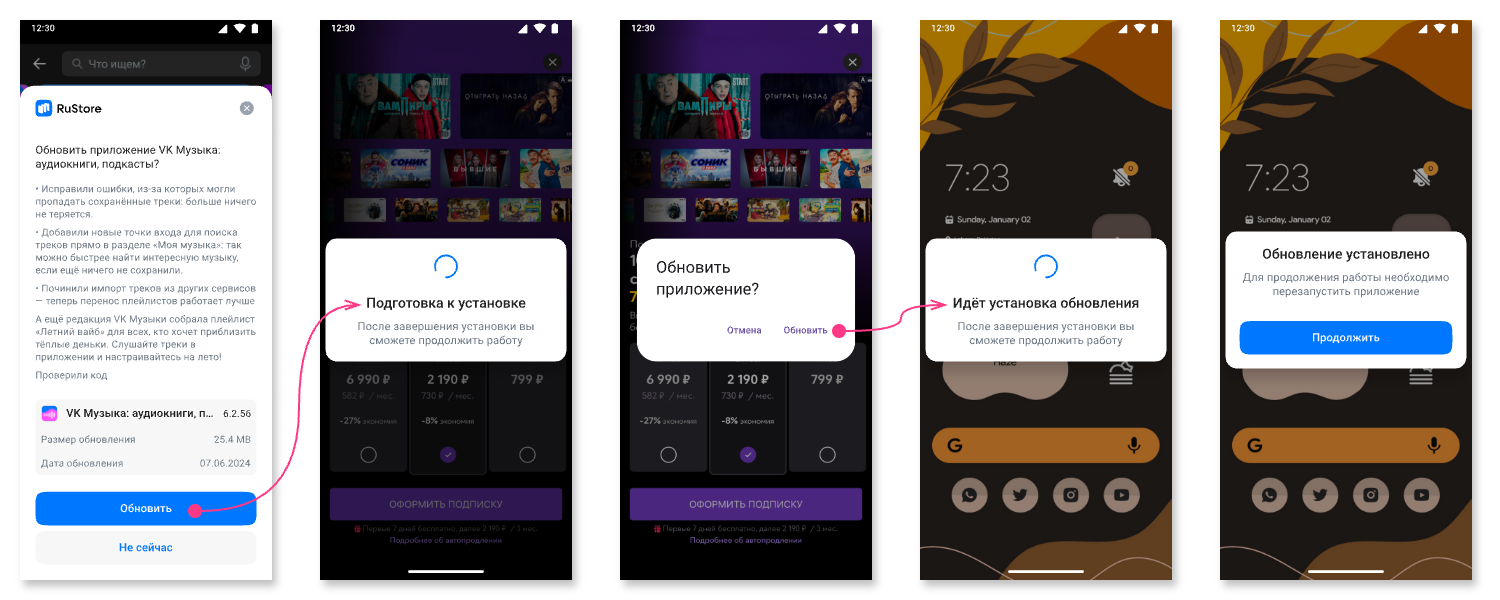
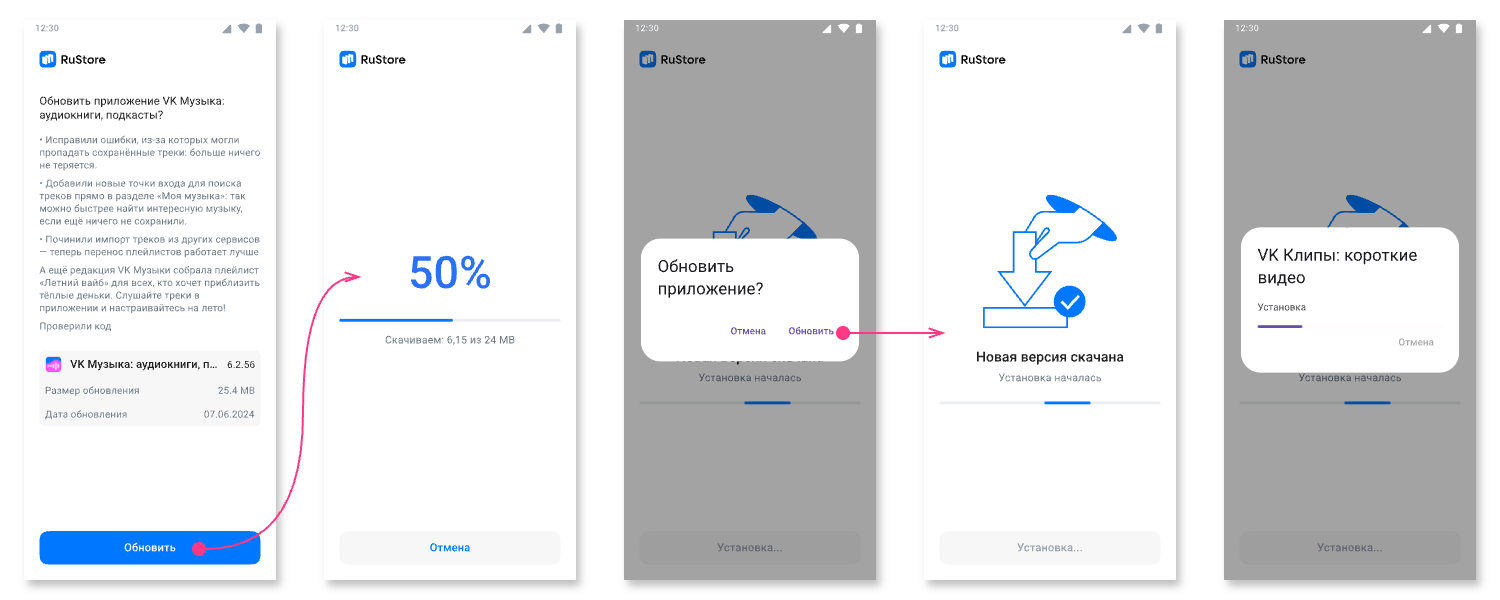
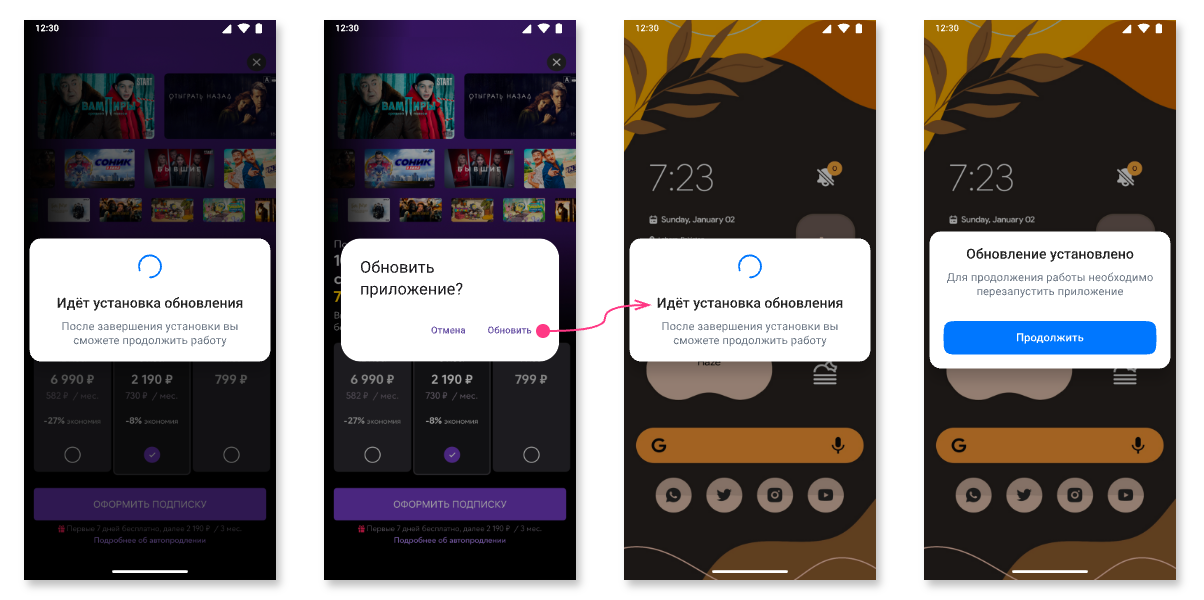
Use RuStore In-app updates SDK to implement various update methods. Currently supported: delayed, silent (without UI from RuStore) and forced update.
Check out the sample app to learn how to properly integrate the update SDK.
User Scenarios
- Delayed Update
- Forced Update
- Silent Update
Connecting to the Project
-
Go to the Releases section of the project repository on GitFlic.
-
Download artifacts from the selected release:
extension_rustore_appupdate.zipextension_rustore_core.zip
- Unpack the downloaded archives into the root of your Defold project to get the following structure:
📁 your_project
├─ 📁 extension_rustore_appupdate
│  ├─ 📁 lib
│  ├─ 📁 manifests
│  ├─ 📁 src
│  └─ ext.manifest
└─ 📁 extension_rustore_core
   ├─ 📁 include
   ├─ 📁 lib
   ├─ 📁 manifests
   ├─ 📁 src
   └─ ext.manifest
Creating an Update Manager
Before calling library methods, you must create an update manager.
function init(self)
    rustoreappupdate.init()
end
Checking for Available Updates
Before requesting an update, check to see if an update is available for your application. To check for updates, call the methodget_appupdateinfo. When calling this method, the following conditions are checked.
- The current version of RuStore is installed on the user's device.
- The user and the app are not banned in RuStore.
- RuStore app is allowed to install applications.
- User is authorized in RuStore.
Before using the method, you must subscribe to events once:
rustore_get_app_update_info_success;rustore_get_app_update_info_failure.
function init(self)
    rustorecore.connect("rustore_get_app_update_info_success", _on_get_app_update_info_success)
    rustorecore.connect("rustore_get_app_update_info_failure", _on_get_app_update_info_failure)

    -- Initializing rustoreappupdate
end

function _on_get_app_update_info_success(self, channel, value)
    local data = json.decode(value)

    if data.updateAvailability == RuStoreAppUpdateEnums.UpdateAvailability.UNKNOWN then
        -- Process UNKNOWN
    elseif data.updateAvailability == RuStoreAppUpdateEnums.UpdateAvailability.UPDATE_NOT_AVAILABLE then
        -- Process UPDATE_NOT_AVAILABLE
    elseif data.updateAvailability == RuStoreAppUpdateEnums.UpdateAvailability.UPDATE_AVAILABLE then
        -- Process UPDATE_AVAILABLE
    elseif data.updateAvailability == RuStoreAppUpdateEnums.UpdateAvailability.DEVELOPER_TRIGGERED_UPDATE_IN_PROGRESS then
        -- Process DEVELOPER_TRIGGERED_UPDATE_IN_PROGRESS
    else
        local anotherValue = tostring(data.updateAvailability)
    end
end

function _on_get_app_update_info_failure(self, channel, value)
    local data = json.decode(value)
end
rustoreappupdate.get_appupdateinfo()
rustore_get_app_update_info_success returns line JSON, which contains information about the need for an update. Request this information in advance to start the update download without delay at a convenient time for the user.
-
updateAvailability— update availability:UNKNOWN (int == 0)— by default.UPDATE_NOT_AVAILABLE (int == 1)— no update needed.UPDATE_AVAILABLE (int == 2)— an update is required to be downloaded or an update has already been downloaded to the user's device.DEVELOPER_TRIGGERED_UPDATE_IN_PROGRESS (int == 3)— the update is already downloading or installation has already started.
-
installStatus— update installation status if the user is already installing the update at the current time:UNKNOWN (int == 0)— by default.DOWNLOADED (int == 1)— downloaded.DOWNLOADING (int == 2)— downloading.FAILED (int == 3)— error.PENDING (int == 5)— in anticipation.
-
availableVersionCode— update version code.
rustore_get_app_update_info_failure returns line JSON with error information. The error structure is described in the Error Handling section.
An update download can only be started if the updateAvailability field contains the valueUPDATE_AVAILABLE.
Downloading and Installing Updates
Using a Listener
After confirming update availability, you can receive the update download status. To do this, you need to subscribe to the on_state_updated event and call the register_listener method to launch a download status listener.
Checking Update Download Status
Subscribing to the rustore_on_state_updated event is performed once. Listening to the download process is activated using the register_listener method.
function init(self)
    -- Initialize rustoreappupdate

    rustorecore.connect("rustore_on_state_updated", _on_state_updated)
    rustoreappupdate.register_listener()
end

function _on_state_updated(self, channel, value)
    local data = json.decode(value)

    local percentDownloaded = 0
    if data.totalBytesToDownload > 0 then
        percentDownloaded = data.bytesDownloaded / data.totalBytesToDownload * 100
    end

    if data.installStatus == RuStoreAppUpdateEnums.InstallStatus.DOWNLOADED then
        percentDownloaded = 100
    end
end
The rustore_on_state_updated callback returns a JSON string (an InstallState object) with information about the progress of the update process. The object contains the following fields.
-
installStatus— update installation status if the user is already installing the update at the current time:UNKNOWN (int == 0)— by default.DOWNLOADED (int == 1)— downloaded.DOWNLOADING (int == 2)— downloading.FAILED (int == 3)— error.PENDING (int == 5)— in anticipation.
The update SDK does not have a special status for the situation when the user has canceled the update download. If the user aborted the update during the download phase, installStatus returns the original status UNKNOWN (0) with a Download button.
If the user has already downloaded the update, but canceled the installation, then installStatus will return the value DOWNLOADED (1).
Let's consider the following options.
- The user started downloading the update, but canceled the download - in this case:
updateAvailability-UPDATE_AVAILABLE(2);installStatus-UNKNOWN(0).
- The user downloaded the update file, but did not install it - in this case:
updateAvailability-UPDATE_AVAILABLE(2);installStatus-DOWNLOADED(1).
bytesDownloaded— number of bytes downloaded.totalBytesToDownload— the total number of bytes to download.packageName— service pack name.installErrorCode— error code during download. Error codes are described in the section Error handling.
Deleting a Listener
If the listener is no longer needed, use the unregister_listener method to remove the listener.
rustoreappupdate.unregister_listener()
Starting the Update Download
Delayed Update
Run update script
Before using the methods for launching update scripts, you must subscribe to events once:
rustore_start_update_flow_success;rustore_start_update_flow_failure.
To start downloading an application update, use the start_update_flow_delayed method.
The AppUpdateInfo object becomes invalid after a single use. To call the start_update_flow_delayed method again, request the AppUpdateInfo object again using the get_appupdateinfo method.
See the Checking for updates section.
function init(self)
    rustorecore.connect("rustore_start_update_flow_success", _on_start_update_flow_success)
    rustorecore.connect("rustore_start_update_flow_failure", _on_start_update_flow_failure)

    -- Initialization rustoreappupdate
end

function _on_start_update_flow_success(self, channel, value)
    local data = json.decode(value)

    if data.flowResult == RuStoreAppUpdateEnums.UpdateFlowResult.RESULT_OK then
        -- Process RESULT_OK
    elseif data.flowResult == RuStoreAppUpdateEnums.UpdateFlowResult.RESULT_CANCELED then
        -- Process RESULT_CANCELED
    elseif data.flowResult == RuStoreAppUpdateEnums.UpdateFlowResult.RESULT_OK then
        -- Process ACTIVITY_NOT_FOUND
    else
        local anotherValue = tostring(data.flowResult)
    end
end

function _on_start_update_flow_failure(self, channel, value)
    local data = json.decode(value)
end
rustoreappupdate.start_update_flow_delayed()
The rustore_start_update_flow_success callback returns a JSON string with information about the update result in the flowResult (number) field:
RESULT_OK (int = -1)- the user confirmed downloading the update.RESULT_CANCELED (int = 0)- the user refused to download the update.
The rustore_start_update_flow_failure callback returns a JSON string with error information. The error structure is described in the Error Handling section.
After receiving the DOWNLOADED (int == 1) status in the installStatus field of the InstallState object, the install update method can be called.
Forced Update
Running the update script
After receiving a successful response fromget_appupdateinfo, you can check the availability of a force update using the methodcheck_is_immediate_update_allowed.
local isAvailable = rustoreappupdate.check_is_immediate_update_allowed()
true- forced update is available.false- forced update is not available.
Result of the method check_is_immediate_update_allowed is recommended to be used to decide whether to run a forced update, but this result does not affect the ability to run the script. The need to run the update script may occur according to your internal logic.
Before using the methods for launching update scripts, you must subscribe to events once:
rustore_start_update_flow_success;rustore_start_update_flow_failure.
To start downloading an application update, use the start_update_flow_immediate method.
The AppUpdateInfo object becomes invalid after a single use. To call the start_update_flow_immediate method again, request the AppUpdateInfo object again using the get_appupdateinfo method.
See the Checking for updates section.
function init(self)
    rustorecore.connect("rustore_start_update_flow_success", _on_start_update_flow_success)
    rustorecore.connect("rustore_start_update_flow_failure", _on_start_update_flow_failure)

    -- Initialization rustoreappupdate
end

function _on_start_update_flow_success(self, channel, value)
    local data = json.decode(value)

    if data.flowResult == RuStoreAppUpdateEnums.UpdateFlowResult.RESULT_OK then
        -- Process RESULT_OK
    elseif data.flowResult == RuStoreAppUpdateEnums.UpdateFlowResult.RESULT_CANCELED then
        -- Process RESULT_CANCELED
    elseif data.flowResult == RuStoreAppUpdateEnums.UpdateFlowResult.RESULT_OK then
        -- Process ACTIVITY_NOT_FOUND
    else
        local anotherValue = tostring(data.flowResult)
    end
end

function _on_start_update_flow_failure(self, channel, value)
    local data = json.decode(value)
end
rustoreappupdate.start_update_flow_immediate()
The rustore_start_update_flow_success callback returns a JSON string with information about the update result in the flowResult (number) field:
RESULT_OK (int = -1)- update completed, the code may not be received, because the application terminates at the time of update.RESULT_CANCELED (int = 0)- the flow was interrupted by the user or an error occurred. It is assumed that upon receiving this code, the application should be terminated.ACTIVITY_NOT_FOUND (int = 2)- RuStore is not installed, or a version is installed that does not support forced updating (RuStore versionCode<191).
The rustore_start_update_flow_failure callback returns a JSON string with error information. The error structure is described in the Error Handling section.
If the update is successful, no further action is required.
Silent Update
Run update script
Before using the methods for launching update scripts, you must subscribe to events once:
rustore_start_update_flow_success;rustore_start_update_flow_failure.
To start downloading an application update, use the start_update_flow_silent method.
The AppUpdateInfo object becomes invalid after a single use. To call the start_update_flow_immediate method again, request the AppUpdateInfo object again using the get_appupdateinfo method.
See the Checking for updates section.
function init(self)
    rustorecore.connect("rustore_start_update_flow_success", _on_start_update_flow_success)
    rustorecore.connect("rustore_start_update_flow_failure", _on_start_update_flow_failure)

    -- Initialization rustoreappupdate
end

function _on_start_update_flow_success(self, channel, value)
    local data = json.decode(value)

    if data.flowResult == RuStoreAppUpdateEnums.UpdateFlowResult.RESULT_OK then
        -- Process RESULT_OK
    elseif data.flowResult == RuStoreAppUpdateEnums.UpdateFlowResult.RESULT_CANCELED then
        -- Process RESULT_CANCELED
    elseif data.flowResult == RuStoreAppUpdateEnums.UpdateFlowResult.RESULT_OK then
        -- Process ACTIVITY_NOT_FOUND
    else
        local anotherValue = tostring(data.flowResult)
    end
end

function _on_start_update_flow_failure(self, channel, value)
    local data = json.decode(value)
end
rustoreappupdate.start_update_flow_silent()
The rustore_start_update_flow_success callback returns a JSON string with information about the update result in the flowResult (number) field:
RESULT_OK (int = -1)- the update download task has been registered.
The rustore_start_update_flow_failure callback returns a JSON string with error information. The error structure is described in the Error Handling section.
Call the install update method after receiving the DOWNLOADED (int == 1) status in the installStatus field of the InstallState object.
For a silent update, it is recommended to implement your own interface.
Installing the Update
Once the update file download is complete, you can start installing the update. The update occurs through the native Android tool. To start the update installation, use the following methods:
complete_update_flexible- update and restart the application;complete_update_silent- update and close the application.
It is recommended to notify the user that the update is ready for installation.
Before using the methods, you must subscribe to the event once:
on_complete_update_failure.
function init(self)
    rustorecore.connect("rustore_complete_update_failure", _on_complete_update_failure)

    -- Initialization rustoreappupdate
end

function _on_complete_update_failure(self, channel, value)
    local data = json.decode(value)
end
The rustore_complete_update_failure callback returns a json string with error information. The error structure is described in the Error Handling section.
Flexible Update Finalization
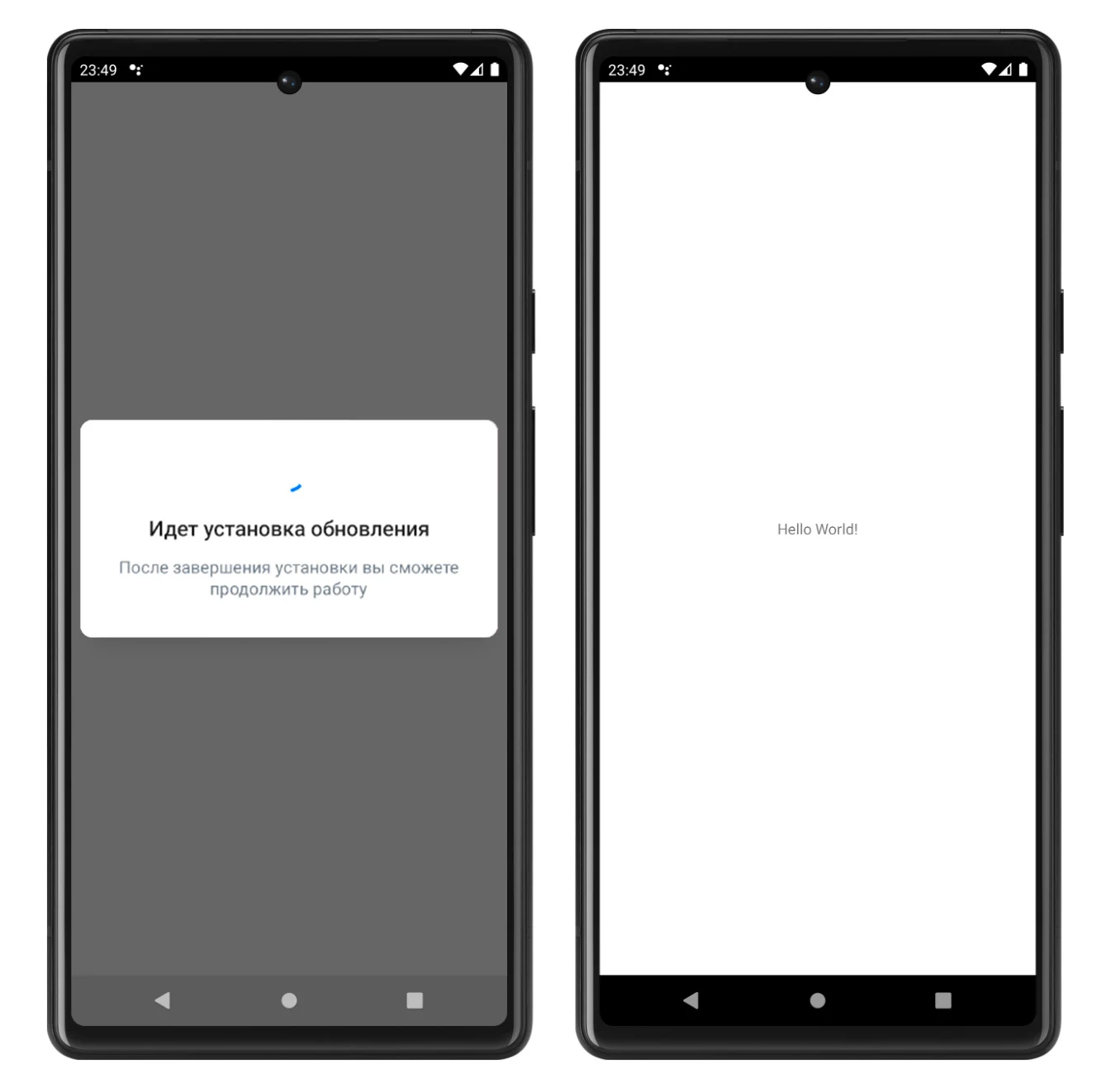
rustoreappupdate.complete_update_flexible()
Update with UI from RuStore:
-
The user will be shown a UI dialog to complete the update.
-
If the update is successful, the application will be restarted.
Silent Update Finalization
rustoreappupdate.complete_update_silent()
Update without UI from RuStore:
- The update completion UI dialog will not be shown.
- If the update is successful, the application will be closed.
Error Handling
When receiving any *_failure event, it is not recommended to display an error to the user yourself. Displaying an error may negatively impact the user experience.
function _on_failure(self, channel, value)
    local data = json.decode(value)

    local name = data.simpleName
    local message = data.detailMessage
end
simpleName– error name.detailMessage– error description.
Possible Errors
RuStoreNotInstalledException— RuStore is not installed on the user's device;RuStoreOutdatedException— RuStore version installed on the user's device does not support this SDK;RuStoreUserUnauthorizedException— user is not authorized in RuStore;RuStoreException— basic RuStore error from which other errors are inherited;RuStoreInstallException(public val code: Int)— download and installation error.ERROR_UNKNOWN(Int = 4001)— unknown error.ERROR_DOWNLOAD(Int = 4002)— error while downloading.ERROR_BLOCKED(Int = 4003)— installation blocked by system.ERROR_INVALID_APK(Int = 4004)— invalid update APK.ERROR_CONFLICT(Int = 4005)— conflict with the current app version.ERROR_STORAGE(Int = 4006)— insufficient device storage.ERROR_INCOMPATIBLE(Int = 4007)— incompatible with device.ERROR_APP_NOT_OWNED(Int = 4008)— application not purchased.ERROR_INTERNAL_ERROR(Int = 4009)— internal error.ERROR_ABORTED(Int = 4010)— user refused to install the update.ERROR_APK_NOT_FOUND(Int = 4011)— APK for installation not found.ERROR_EXTERNAL_SOURCE_DENIED(Int = 4012)— update prohibited. For example, the first method responses that an update is not available, but the user calls the second method.ERROR_ACTIVITY_SEND_INTENT(Int = 9901)— error while sending intent for opening an activity.ERROR_ACTIVITY_UNKNOWN(Int = 9902)— unknown error on activity opening.