Ratings and Reviews SDK for Godot (version 8.0.0)
General
RuStore In-app Review SDK prompts the user to rate your app and leave feedback on RuStore without exiting the app.
Rating and feedback user scenarios may be run at any time throughout the user’s path in your app. The user can rate your app from 1 to 5 and leave feedback. Feedback is optional.
Implementation example
Review the example app to learn how to correctly integrate the Reviews and Ratings SDK.
User scenario example
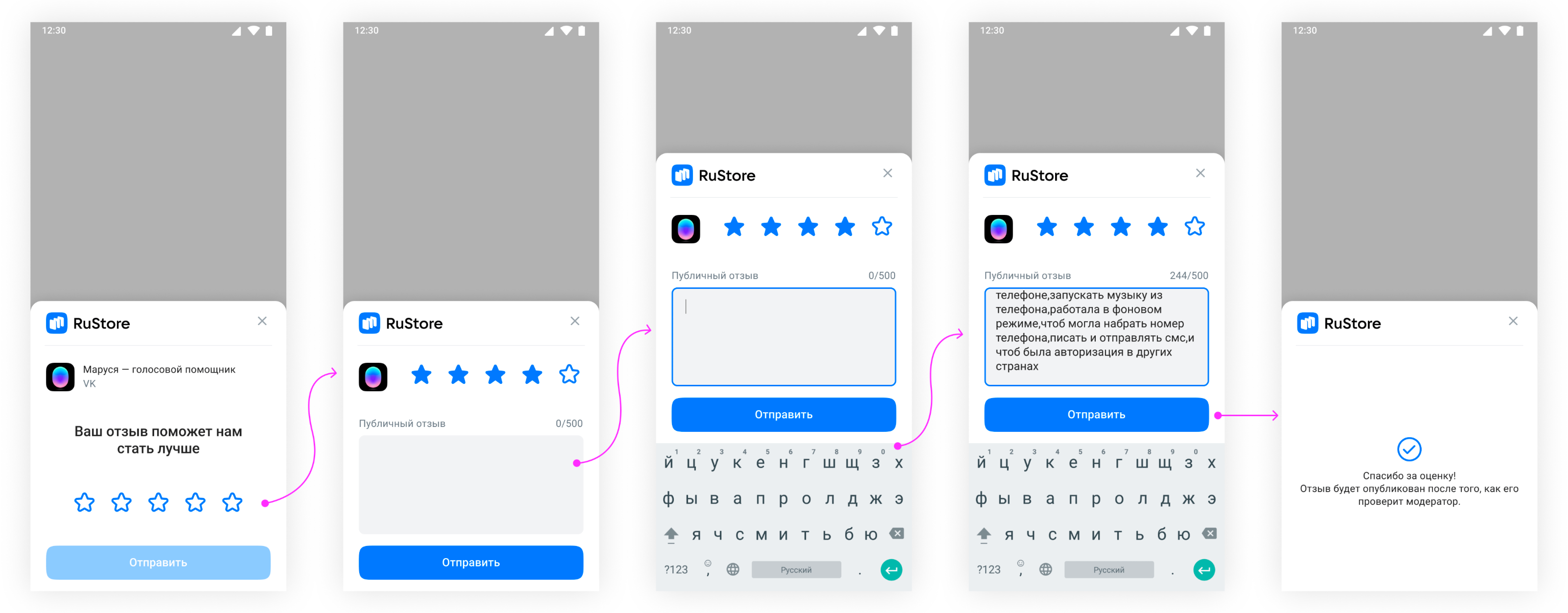
When to request an in-app rating and review
Use the tips below to decide when to ask the user to rate and leave feedback: (See below
-
Start the process once the user has been using your app for long enough.
-
Avoid starting it too often as this will impair your app’s user experience and limit the use or SDK ratings.
-
Avoid using calls to action like “Rate App” button as the user could have already reached the process starting limit.
-
Your app should not ask the user any questions before the start or while the process is running, including their opinion (“Do you like the app?”) or predictive questions (“Would you give this app 5 stars?”).
Design recommendations
Use the tips below to decide how to integrate the process:
-
Display the process as is, without any intervention or modification of existing design, including size, opacity, shape and other properties.
-
Add nothing on top or on sides of the process.
-
The process should open on top of all layers. Don’t close the process after starting. The process will close by itself after an express action by the user.
Connecting to the project
The plugin libraries in this repository are built for Godot Engine 4.2.1. If you use a different Godot Engine version, follow the steps in Rebuilding the plugin.
- Copy the plugin projects from the official RuStore repository on GitFlic.
- Copy the contents of
godot_example/android/pluginstoyour_project/android/plugins. - In the Android export preset, in the
Pluginslist, enable theRu Store Godot ReviewandRu Store Godot Coreplugins.
Working with user ratings
Getting started with user ratings
To work with evaluations, you need to create an instance of RuStoreGodotReviewManager.
Initialisation
var _review_client: RuStoreGodotReviewManager = null

func _ready:
    _review_client = RuStoreGodotReviewManager.get_instance()
Preparing to request an app rating
Callrequest_review_flow in advance before calling launch_review_flow, to prepare necessary information to display. ReviewInfo has a lifetime — about five minutes.
You must subscribe to events once before using this method:
on_request_review_flow_success;on_request_review_flow_failure.
func _ready():
    # Initialization of _review_client

    _review_client.on_request_review_flow_success.connect(_on_request_review_flow_success)
    _review_clientt.on_request_review_flow_failure.connect(_on_request_review_flow_failure)

func _on_request_review_flow_success():
    pass

func _on_request_review_flow_failure(error: RuStoreError):
    pass
_review_client.request_review_flow()
The on_request_review_flow_failure callback returns RuStoreError with error information. The error structure of RuStoreError is described in Error Handling.
Triggering the in-app rating flow
To run the feedback form in your app, call thelaunch_review_flow method using the previously obtained ReviewInfo.
You must subscribe to events once before using this method:
on_request_review_flow_success;on_request_review_flow_failure.
func _ready():
    # Initialization of _review_client

    _review_client.on_launch_review_flow_success.connect(_on_launch_review_flow_success)
    _review_client.on_launch_review_flow_failure.connect(_on_launch_review_flow_failure)

func _on_launch_review_flow_success():
    pass

func _on_launch_review_flow_failure(error: RuStoreError):
    pass
_review_client.launch_review_flow()
on_launch_review_flow_success or on_launch_review_flow_failure to proceed with the application.
The on_launch_review_flow_failure callback returns RuStoreError with error information. The error structure of RuStoreError is described in Error Handling.
Success or Failure), it is not recommended to display any additional forms related to assessment and feedback.
If called frequently, launch_review_flow will not display the feedback window to the user, as the allowed display is regulated by RuStore.
Handling errors
The errors that occur can be retrieved in the events*_failure.
Error structure
class_name RuStoreError extends Object

var description: String

func _init(json: String = ""):
	if json == "":
		description = ""
	else:
		var obj = JSON.parse_string(json)
		description = obj["detailMessage"]
description– error description.
Error list
RuStoreNotInstalledException— RuStore is not installed on the user's device;RuStoreOutdatedException— RuStore version installed on the user's device does not support this SDK;RuStoreUserUnauthorizedException— user is not authorized in RuStore;RuStoreRequestLimitReached— not enough time has passed since the process was last shown;RuStoreReviewExists— this user has already rated your app;RuStoreInvalidReviewInfo— problems withReviewInfo;RuStoreException— basic RuStore error from which other errors are inherited.